Chapter 3: Tactical QoS Policy
Translating QoS Strategy into Tactical Designs
To meet the demands of today’s media-rich networks, administrators should articulate a QoS strategy that reflects their business intent. This strategy details which applications are business relevant and which applications are not business relevant, as well as how these applications are to be marked and treated over the IP network. Furthermore, this QoS strategy is end-to-end and is not constrained by any technical or administrative limitation.
While defining such an unconstrained QoS strategy is an important part of the deployment process, when it comes to practical deployment, various technical constraints have to be taken into account, including the following:
- Hardware constraints
- Software constraints
- Media capability constraints
- Bandwidth constraints
- Service provider constraints
Thus the goal of tactical QoS design is to adapt the QoS strategy to the maximum of each platform’s capabilities, subject to all relevant constraints.
The following are additional recommendations to keep in mind during the tactical design phase:
- Only enable QoS features if these directly contribute to expressing the QoS strategy on the given platform.
- Leverage QoS design best-practices to generate platform specific configurations that reflect the QoS strategy with maximum fidelity.
QoS Design Best Practices
The following sections discuss generic best practices for QoS design.
Hardware vs. Software QoS Design
Some Cisco routers, such as Cisco Integrated Services Routers (ISRs), perform QoS in software, which places incremental loads on the CPU. The actual incremental load depends on the numerous factors, including: the complexity and functionality of the policy, the volume and composition of the traffic, the speed of the interface, the speed of the CPU, the memory of the router, etc. On the other hand, other devices (such as Cisco Catalyst switches) often perform QoS in dedicated hardware—Application Specific Integrated Circuits (ASICs). As such, these switches can perform even the most complex QoS policy on maximum traffic loads at line rates on GE/10GE/40GE/100GE interfaces—all without any marginal CPU tax. Thus, whenever a choice exists, Cisco recommends implementing QoS policies in devices that perform QoS operations in hardware—rather than software—as this will result in more efficient utilization of network infrastructure resources.
For example, suppose an administrator has the option of deploying classification and marking policies in a branch network in either a Catalyst switch (in hardware) or at the LAN-edge interface of an ISR router (in software). Because a choice exists as to where the policy should be deployed, it would be more efficient to classify and mark within the Catalyst switch.
However, there may be cases where such a choice doesn’t exist. Continuing the example: there may be a business need to perform deep-packet inspection on branch-originated traffic (which may not be supported on the particular Catalyst switch model deployed at the branch), and as such the administrator would then have to apply the required classification and marking policies on the ISR router.
Classification and Marking Best Practices
When classifying and marking traffic, a recommended design best practice is to classify and mark applications as close to their sources as technically and administratively feasible. This principle promotes end-to-end differentiated services and PHBs.
In general, it is not recommended that you trust markings that can be set by end users on their PCs or other similar devices because end users can easily abuse provisioned QoS policies if permitted to mark their own traffic. For example, if an EF PHB has been provisioned over the network, a PC user can easily configure all their traffic to be marked to EF, thus hijacking network priority queues to service their non-real-time traffic. Such abuse could easily ruin the service quality of real-time applications throughout the enterprise. On the other hand, if enterprise controls are in place to centrally administer PC QoS markings, then it may be an acceptable design option to trust them.
Following this rule, it is further recommended that you use DSCP markings whenever possible, because these Layer 3 IP-header markings are end-to-end, more granular, and more extensible than Layer 2 markings. For example, IEEE 802.1p, IEEE 802.11e (now part of the IEEE 802.11 standard) and MPLS EXP only support three bits (values 0-7) for marking. Therefore, only up to eight classes of traffic can be supported with these marking schemes and inter-class relative priority (such as RFC 2597 Assured Forwarding drop preference markdown) is not supported. On the other hand, Layer 3 DSCP markings allow for up to 64 distinct classes of traffic.
As the line between enterprises and service providers continues to blur and the need for interoperability and complementary QoS markings is critical, you should follow standards-based DSCP PHB markings to ensure interoperability and future expansion.
Policing and Remarking Best Practices
There is little reason to forward unwanted traffic only to police and drop it at a downstream node. Therefore, it is recommended that you police traffic flows as close to their sources as possible.
Whenever supported, markdown should be done according to standards-based rules, such as RFC 2597, the Assured Forwarding PHB. For example, excess traffic marked to AFx1 should be marked down to AFx2 (or AFx3 whenever dual-rate policing—such as defined in RFC 2698—is supported). Following such markdowns, congestion management policies, such as DSCP-based WRED, should be configured to drop AFx3 more aggressively than AFx2, which in turn should be dropped more aggressively than AFx1.
Congestion Management (Queuing) Best Practices
Business-critical applications require service guarantees regardless of network conditions. The only way to provide service guarantees is to enable queuing at any and every node that has the potential for congestion.
In addition, because each application class has unique service level requirements, optimally each should be assigned a dedicated queue. In such a manner, specific bandwidth allocations and dropping policies can be assigned to each discrete application class to meet its distinctive QoS requirements. Otherwise, if multiple application classes are assigned into a common queuing bucket, the administrator no longer can control if bandwidth resources are being shared among these application classes according to their individual requirements.
At a minimum, however, the following standards-based queuing behaviors should be supported:
- Real-time queue(s)—to support an RFC 3246 Expedite Forwarding service
- Guaranteed-bandwidth queue(s) —to support RFC 2597 Assured Forwarding services
- Default queue—to support an RFC 2474 Default Forwarding service
- Bandwidth—constrained queue-to support an RFC 3662 Scavenger service
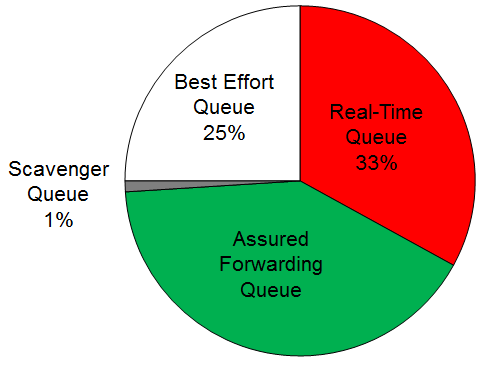
Cisco offers design recommendations for each of these types of queues. These queuing best practices are illustrated in the following figure.
- Queuing Best Practices
Real-Time Queue
The Real-Time queue corresponds to the RFC 3246 EF PHB. The amount of bandwidth assigned to the Real-Time queue is usually variable. However, if the majority of bandwidth is provisioned with strict-priority queuing (which is effectively a first-in, first-out queue), the overall effect is a dampening of QoS functionality. Remember the goal of convergence is to enable voice, video, and data applications to transparently coexist on a single network. When real-time applications dominate a link, non-real-time applications fluctuate significantly in their response times, destroying the transparency of the converged network.
Cisco has done extensive testing and has found that a significant decrease in non-real-time application response times occurs when real-time traffic exceeds one-third of link bandwidth capacity. In fact, both testing and customer deployments have shown that a general best queuing practice is to limit the amount of strict priority queuing to 33% of link bandwidth capacity. This strict priority queuing recommendation is a conservative and safe design ratio for merging real-time applications with data applications.
Finally, WRED—or any similar congestion avoidance mechanism—should never be enabled on the strict priority queue. Traffic assigned to this queue is often highly drop sensitive; therefore, early dropping should never be induced on these flows.
Assured Forwarding Queue
At least one queue should be provisioned as an Assured Forwarding Queue. Per RFC 2597, up to four queues can be provisioned with this service:
- AF Class 1—AF11, AF12, AF13
- AF Class 2—AF21, AF22, AF23
- AF Class 3—AF31, AF32, AF33
- AF Class 4—AF41, AF42, AF43
These queues should have bandwidth guarantees that correspond with the application class requirements of the traffic assigned to it.
In addition, DSCP-based WRED should be enabled on these queues, such that traffic marked AFx3 is (statistically) dropped sooner and more often than AFx2, which in turn is (statistically) dropped more aggressively than AFx1.
Best Effort Queue
The Best Effort Queue is the default treatment for all traffic that has not been explicitly assigned to another queue. Only if an application has been selected for preferential/deferential treatment is it removed from the default class. Because most enterprises have several thousand applications running over their networks, adequate bandwidth must be provisioned for this class as a whole to handle the sheer number and volume of applications that default to it. Therefore, Cisco recommends provisioning at least 25% of link bandwidth for the default Best Effort class.
In addition, it is recommended that you enable WRED on the default class to improve throughput and reduce TCP synchronization. Because all traffic destined to this class is to be marked to the same DSCP value (of 0), there is no “weight” component to the WRED dropping decision, and therefore the congestion algorithm is effectively random early detect.
Less-Than-Best-Effort (Scavenger) Queue
Whenever the Scavenger Queue is enabled, it should be assigned a minimal amount of bandwidth, such as 1% (or whatever the minimal bandwidth allocation that the platform supports).
WRED is not required on the Scavenger class queue because traffic assigned to this queue has no implied “good-faith” service guarantee or expectation. Therefore, there is little to gain by adding this feature and it may even be wasteful of router CPU resources.