Chapter 8: Campus LAN Static QoS Design
Within the EasyQoS solution, different network devices implement the QoS policy to the best of their abilities. With APIC-EM/EasyQoS release 1.3 and higher, Catalyst switches implement one or more of the following QoS policies, depending upon their role within the network infrastructure:
- Ingress classification & marking policies on wired ports based on policy-maps that contain ACLs with Layer 2-4 ACEs.
- Ingress and/or egress queuing policies
The role of the Catalyst switch within the network infrastructure is discussed in detail in the *Catalyst Switch Roles* section below.
- Note: Catalyst 3850 and 3650 Series switches support wired AVC/NBAR-based ingress classification & marking policies with IOS XE 16.3.1 and higher software versions. The APIC-EM 1.6 release of EasyQoS does not use AVC/NBAR-based ingress classification & marking policies. Future versions of EasyQoS may add this support.
TCAM Utilization Challenges
Cisco Catalyst switch platforms implement ingress classification & marking policies that include ACL entries in hardware for performance reasons. This hardware is commonly referred to as Ternary Content Addressable Memory (TCAM). Most Catalyst switch platforms have sufficient QoS TCAM space, such that the ingress classification & marking QoS policies provisioned by EasyQoS do not exceed the available QoS TCAM space. However, a few older Catalyst switch platforms supported by EasyQoS do have limited QoS TCAM space. Because QoS TCAM space is limited on these older Catalyst switch platforms, the ACEs that are provisioned by the EasyQoS ingress classification & marking policies across various platforms can vary slightly. The EasyQoS application is aware of the QoS TCAM space available in supported switch platforms; and will implement ACEs up to the limits of the TCAM-constrained platforms—leaving sufficient TCAM space for additional functionality such as Dynamic QoS and statically learned Cisco devices.
In order to minimize the impact of limited TCAM space on these older platforms, APIC-EM deploys Custom and Favorite applications first. Custom applications are by default marked as Favorite applications, as well. This ensures that the applications most relevant to the network operator are included within the ACEs deployed by EasyQoS.
The following table summarizes the QoS TCAM space for various Catalyst access-layer switch platforms supported by EasyQoS.
- QoS TCAM Space per ASIC for Various Catalyst Access-Layer Switches
| Switch Platform | QoS TCAM Entries |
|---|---|
| Catalyst 2960-X Series | 504 with the lanbase-default SDM template 384 with the default and lanbase-routing SDM Templates |
| Catalyst 2960-XR Series | 512 with all SDM templates |
| Catalyst 2960-S Series | 384 with all SDM templates |
| Catalyst 3560-C Series | 384 with the default SDM template |
| Catalyst 3560-X Series | 512 with all SDM templates other than the routing template 384 with the routing SDM template |
| Catalyst 3750-X Series | 512 with all SDM templates other than the routing template 384 with the routing template |
| Catalyst 3850 Series | 2816 with the Advanced (high scale) SDM template 3072 with the VLAN SDM template |
| Catalyst 3650 Series | 3072 with both the Advanced (low scale) and the VLAN (high scale) SDM templates |
| SM-ES2 Series EtherSwitch Module | 128 with the default and dual-ipv4-and-ipv6 templates 384 with the qos template |
Due to the algorithm for converting ACEs into QoS TCAM masks and entries, there is not necessarily a one-to-one correlation between a single ACE within an ACL and a single TCAM entry. However, a general guideline that can be used is that EasyQoS will require a single TCAM entry for each ACE. Put more simply, if a particular platform has room for 384 QoS TCAM entries (ignoring masks), then in general it can support approximately 384 ACEs within the ACLs of the class-maps within the ingress classification & marking policy, minus any TCAM entries reserved for the platform itself. However, it should be noted that individual applications may be identified via multiple TCP and UDP ports or port ranges. Bi-directionality will also double the ACE entries. Hence each application may result in multiple ACEs within the ingress classification & marking policy. Therefore, those platforms with limited QoS TCAM size have limited ability to support applications specified within the policy created by EasyQoS.
Methodology and Workflow
The general method by which the applications selected within the EasyQoS web-based GUI are translated into ACLs with ACE entries is discussed in the following sections.
CAPWAP Control and Data Traffic
EasyQoS will check to see if there is QoS TCAM space available for additional ACEs within any of the ACLs that are part of the ingress classification & marking QoS policy-map. If so, EasyQoS will generate and deploy ACEs for the prm-APIC_QOS_IN#TUNNELED__acl ACL first. This currently consists of only two ACEs—one for CAPWAP control traffic that uses destination UDP port 5246 and one for CAPWAP data traffic that uses destination UDP port 5247.
Custom Applications
Following the deployment of ACEs for the prm-APIC_QOS_IN#TUNNELED__acl, EasyQoS will again determine if there is sufficient QoS TCAM space available for additional ACEs within any of the ACLs that are part of the ingress classification & marking QoS policy-map. If sufficient QoS TCAM space is available for additional ACEs, EasyQoS will check to see if all ACEs for all Custom applications have been deployed. EasyQoS assigns a Rank to all Custom and Favorite applications. Custom applications have a Rank of 1. Applications within the NBAR taxonomy do not have a Rank by default. However, they are given a Rank of 10,000 when assigned as a Favorite application. EasyQoS processes applications by Rank first—from lowest number to highest number.
If the ACEs for all of the Custom applications have not been deployed, EasyQoS will select the next Custom application. Only Custom applications consisting IP addresses, IP ports, and TCP/UDP ports can be provisioned onto Catalyst switch platforms. This is discussed in the *Access-Control Lists* section below. How EasyQoS determines which ACL to deploy ACE entries for applications, based on the business-relevance and traffic-class attribute values of the application, is also discussed in the *Access-Control Lists* section below.
EasyQoS will continue to check for available QoS TCAM space and continue to deploy ACEs for Custom applications until either all Custom applications have been deployed, or the available QoS TCAM space is exhausted.
Favorite Applications
After ACEs for all Custom applications have been deployed, EasyQoS will begin parsing the applications within the NBAR taxonomy. If sufficient QoS TCAM space is available for additional ACEs, EasyQoS will check to see if all ACEs for Favorite applications have been deployed. This is because EasyQoS processes applications by Rank first, and Favorite applications are assigned a rank of 10,000. If the ACEs for all of the Favorite applications have not been deployed, EasyQoS will select the next Favorite application.
EasyQoS will check to see if the Favorite application has the traffic-class attribute set to one of the following:
- VoIP Telephony
- Broadcast Video
- Real-Time Interactive
- Multimedia Conferencing.
If the traffic-class attribute for the Favorite application matches one of these, EasyQoS will check to see if any of the indicative ports for the Favorite application are duplicates. Many voice and video apps known to NBAR include indicative ports for signaling protocols such as SIP, Cisco SCCP, STUN, etc. Signaling protocols should not be configured into voice and video ACLs. Instead they should appear within the Signaling ACL. Hence they should not be duplicated within the voice and video ACLs. Additionally many collaboration applications include indicative ports for additional functionality such as IMAP, etc. Email protocols should appear within the Bulk Data ACL. Hence they should not be duplicated within the voice and video ACLs either.
For the purposes of this document voice and video ACLs refer to the following ACLs:
- prm-APIC_QOS_IN#VOICE__acl
- prm-APIC_QOS_IN#BROADCAST__acl
- prm-APIC_QOS_IN#REALTIME__acl
- prm-APIC_QOS_IN#MM_CONF__acl.
EasyQoS will also check to see if the Favorite application is identified by any other indicative TCP or UDP ports. If the ports by which the application is identified correspond to TCP destination ports 80, 443, or 8080, EasyQoS will again not implement ACEs for these ports. This is because many applications use the ports corresponding to HTTP (port 80 or 8080) and HTTPS (port 443). Hence, Layer 2-4 ACEs are not effective at identifying applications that use these ports.
If the Favorite application is identified by any other indicative UDP or TCP ports, EasyQoS will generate ACEs for that Favorite application. The ACE entry(s) will be generated under the class-map definition based on the traffic-class attribute to which the Favorite application belongs to within the NBAR taxonomy—only if the business-relevance attribute is set for Business Relevant. If the business-relevance attribute is set for Business Irrelevant, the ACE entry(s) will be generated under the class-map definition for Scavenger traffic. If the business-relevance attribute is set for Default, no ACE entry(s) will be generated under any class-map definition. EasyQoS will continue to do this until either all Favorite applications have been deployed or the available QoS TCAM space is exhausted.
Other Applications within the NBAR Taxonomy
After all Favorite applications are deployed, EasyQoS will determine if there is any available QoS TCAM space left for additional ACE entries. If available space exists, EasyQoS will distribute the available space across the various traffic-classes. By distributing the available TCAM space across the various traffic-classes, EasyQoS ensures that at least some applications from the NBAR taxonomy for each traffic class are represented in the ACLs that are generated for each traffic class. EasyQoS selects applications from each of the traffic-classes based upon popularity—otherwise known as the NBAR commonly-used attribute. Every application within the NBAR taxonomy is assigned a value for the commonly-used attribute. Values range from 10 (most popular) to 1 (least popular).
EasyQoS will select an application from one of the traffic-classes based upon popularity. If multiple applications have the same popularity, EasyQoS will select the next application alphabetically from those that have the same popularity. EasyQoS will check to see if the application has the traffic-class attribute set to one of the following:
- VoIP Telephony
- Broadcast Video
- Real-Time Interactive
- Multimedia Conferencing
If the traffic-class attribute for the application matches one of these, EasyQoS will check to see if any of the indicative ports for the application are duplicates. Many voice and video apps known to NBAR include indicative ports for signaling protocols such as SIP, Cisco SCCP, STUN, etc. Signaling protocols should not be configured into voice and video ACLs. Instead they should appear within the Signaling ACL. Hence they should not be duplicated within the voice and video ACLs. Additionally many collaboration apps include indicative ports for additional functionality such as IMAP, etc. Email protocols should appear within the Bulk Data ACL. Hence they should not be duplicated within the voice and video ACLs either. For the purposes of this document voice and video ACLs refer to the following ACLs:
- prm-APIC_QOS_IN#VOICE__acl
- prm-APIC_QOS_IN#BROADCAST__acl
- prm-APIC_QOS_IN#REALTIME__acl
- prm-APIC_QOS_IN#MM_CONF__acl.
EasyQoS will also check to see if the application is identified by any other indicative TCP or UDP ports. If the ports by which the application is identified correspond to TCP destination ports 80, 443, or 8080, EasyQoS will again not implement ACEs for these ports. This is because many applications use the ports corresponding to HTTP (port 80 or 8080) and HTTPS (port 443). Hence, Layer 2-4 ACEs are not effective at identifying applications that use these ports.
If the application is identified by any other indicative UDP or TCP ports, EasyQoS will generate ACEs for that application. The ACE entry(s) will be generated under the class-map definition based on the traffic-class attribute to which the application belongs to within the NBAR taxonomy—only if the business-relevance attribute is set for Business Relevant. If the business-relevance attribute is set for Business Irrelevant, the ACE entry(s) will be generated under the class-map definition for Scavenger traffic. If the business-relevance attribute is set for Default, no ACE entry(s) will be generated under any class-map definition. EasyQoS will continue to do this until either all applications within the traffic-class have been deployed or the available QoS TCAM space for the traffic-class is exhausted.
EasyQoS will continue to do this for all traffic-classes until either all applications within all traffic-classes have been deployed or the available QoS TCAM space for all traffic-classes is exhausted.
Catalyst Switch Roles
Catalyst and Nexus switch platforms can function in one of the following three possible roles within APIC-EM—reflecting a traditional 3-tiered campus architecture:
- Core-layer switch
- Distribution-layer switch
- Access-layer switch
When APIC-EM discovers and places network devices into the device inventory database, it will classify each network device in one of five roles, discussed in the *APIC-EM and the EasyQoS Application* chapter of this document. For Catalyst and Nexus switches, EasyQoS uses the device role in order to determine what, if any, ingress classification & marking QoS policy to apply to each switch port, based on the role of the switch within the network infrastructure. Hence, it is highly important that the network operator review (and if necessary modify) the role of each network device within APIC-EM before implementing EasyQoS policies.
The following figure shows the roles the various supported Catalyst and Nexus switches can participate within the EasyQoS Solution; as well as the QoS policies applied to each switch based upon its role.
- Catalyst and Nexus Switch Roles within the EasyQoS Solution
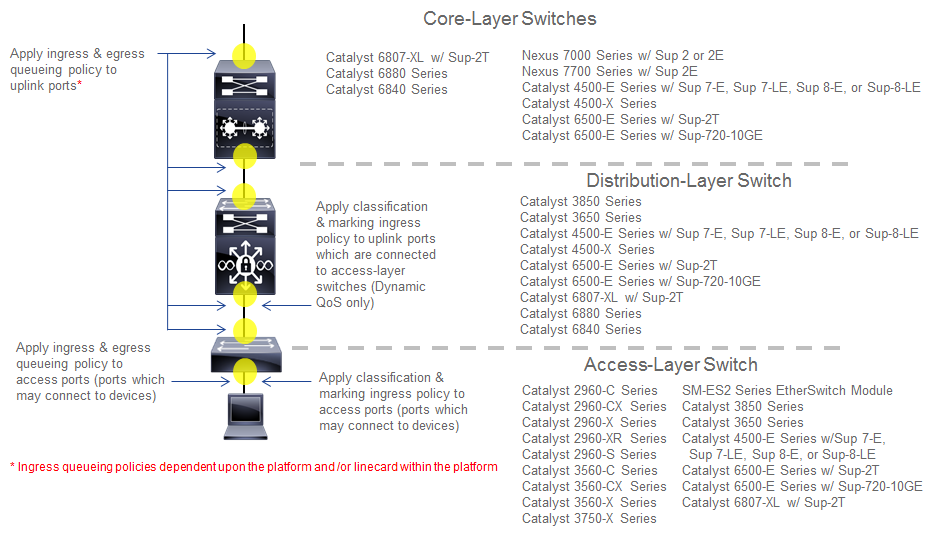
The following are the restrictions regarding the roles that the various supported Catalyst and Nexus switch platforms can have within the EasyQoS solution.
- Catalyst 6500-E Series switches with Sup-2T supervisors, Catalyst 6500-E Series switches with Sup-720-10GE supervisors, Catalyst 6807-XL switches with Sup-2T, and Catalyst 4500-E Series switches with Sup7-E, Sup7-LE, and Sup-8E supervisors are supported in the roles of a core-layer, distribution-layer, or access-layer switch.
- Nexus 7000 Series with Sup2 or 2E supervisors, and Nexus 7700 with Sup2E supervisors are supported only in the role of a core-layer switch.
- Catalyst 6880 Series switches, Catalyst 6840 Series switches, and Catalyst 4500-X Series switches are supported only in the roles of a core-layer or distribution-layer switch.
- Catalyst 3850 Series switches and Catalyst 3650 Series switches are supported in the roles of a distribution-layer or an access-layer switch.
- Catalyst 2960-X, 2960-XR, 2960-S, 3560-X, 3560-C, and 3560-CX Series switches, as well as the SM-ES2 Series EtherSwitch module, are only supported in the role of an access-layer switch.
A single switch functioning as both a distribution-layer switch and an access-layer switch simultaneously is not supported. Multiple switch platforms of the same model can individually function in the role of a distribution-layer switch or access-layer switch within a single deployment.
Core-Layer Switch QoS Design
For devices operating as core-layer switches, EasyQoS will only apply ingress and/or egress queuing policies to the uplinks ports. Uplink ports refer to ports that connect to other core-layer switches or to distribution-layer switches. The specifics as to whether both ingress and egress queuing policies, or only egress queuing policies are applied, are dependent upon whether the particular Catalyst or Nexus switch platform and/or line card within the platform supports both ingress and egress queuing, or only egress queuing. This is discussed in detail for each platform and/or line card in the queuing design sections of this document.
Because only queuing policies are pushed to core-layer switches by EasyQoS, the QoS policy is the same for core-layer switches, regardless of whether the customer chooses to implement Static or Dynamic QoS. Dynamic QoS is discussed within the *Dynamic QoS Design* chapter.
Access-Layer Switch QoS Design
Access-layer switch QoS design consists of the following policies:
- Ingress/egress queuing policies applied to access-edge switch ports and uplink switch ports
- Ingress classification & marking policies applied to access-edge switch ports
Ingress/Egress Queuing Policies
Regardless of whether the network operator has implemented Static or Dynamic QoS, queuing policies will always be pushed to access-layer switches. The EasyQoS application will apply ingress and/or egress queuing policies to both access-edge ports and uplink ports. Access-edge ports refer to ports that directly connect to end devices, such as laptops, PCs, IP Phones, wireless Access Points, etc. Uplink ports refer to ports that connect to distribution-layer switches. The specifics as to whether both ingress and egress queuing policies, or only egress queuing policies are applied, are dependent upon whether the particular Catalyst switch platform and/or line card within that platform supports both ingress and egress queuing, or only egress queuing. This is discussed in detail for each platform and/or line card in the queuing design sections of this document.
Ingress Classification & Marking Policies
The ingress classification & marking policy provisioned onto access-layer switches by EasyQoS is dependent upon whether the network operator chooses to implement Static QoS or Dynamic QoS. For Static QoS, EasyQoS will apply an access-layer ingress classification & marking policy to all access-edge ports, with the following exceptions:
- Access-edge switch ports which have been excluded from the QoS policy by the network operator, through the EasyQoS web-based GUI. This was discussed in the *Policies* section of the *APIC-EM and the EasyQoS Application* chapter of this document.
- Access-edge switch ports which are connected to Access Points are configured by EasyQoS to trust DSCP markings.
The ingress classification & marking policy consists of policy-maps, which contain class-maps, which in turn contain ACLs with Layer 3 & 4 ACEs. Layer 3 & 4 refers to IP addresses, protocols (that is, TCP, UDP, etc.) and higher-layer ports (HTTP, Telnet, FTP, etc.). The access-layer classification & marking policy establishes the QoS trust boundary and policy enforcement point at the ingress edge of the network.
The following are the class-map definitions for the ingress classification & marking policy pushed by EasyQoS to Catalyst switch platforms, when configured in the role of an access-layer switch within APIC-EM.
!
class-map match-any prm-APIC_QOS_IN#VOICE
match access-group name prm-APIC_QOS_IN#VOICE__acl
class-map match-any prm-APIC_QOS_IN#BROADCAST
match access-group name prm-APIC_QOS_IN#BROADCAST__acl
class-map match-any prm-APIC_QOS_IN#REALTIME
match access-group name prm-APIC_QOS_IN#REALTIME__acl
class-map match-any prm-APIC_QOS_IN#MM_CONF
match access-group name prm-APIC_QOS_IN#MM_CONF__acl
class-map match-any prm-APIC_QOS_IN#MM_STREAM
match access-group name prm-APIC_QOS_IN#MM_STREAM__acl
class-map match-any prm-APIC_QOS_IN#SIGNALING
match access-group name prm-APIC_QOS_IN#SIGNALING__acl
class-map match-any prm-APIC_QOS_IN#OAM
match access-group name prm-APIC_QOS_IN#OAM__acl
class-map match-any prm-APIC_QOS_IN#TRANS_DATA
match access-group name prm-APIC_QOS_IN#TRANS_DATA__acl
class-map match-any prm-APIC_QOS_IN#BULK_DATA
match access-group name prm-APIC_QOS_IN#BULK_DATA__acl
class-map match-any prm-APIC_QOS_IN#SCAVENGER
match access-group name prm-APIC_QOS_IN#SCAVENGER__acl
class-map match-any prm-APIC_QOS_IN#TUNNELED
match access-group name prm-APIC_QOS_IN#TUNNELED__acl
!
The following is the policy-map definition for the ingress classification & marking policy pushed by EasyQoS to the switch platforms, when the default Queuing Profile (CVD_Queuing_Profile) is selected within the Advanced Settings section of the EasyQoS web-based GUI.
!
policy-map prm-APIC_QOS_IN
class prm-APIC_QOS_IN#VOICE
set dscp ef
class prm-APIC_QOS_IN#BROADCAST
set dscp cs5
class prm-APIC_QOS_IN#REALTIME
set dscp cs4
class prm-APIC_QOS_IN#MM_CONF
set dscp af41
class prm-APIC_QOS_IN#MM_STREAM
set dscp af31
class prm-APIC_QOS_IN#SIGNALING
set dscp cs3
class prm-APIC_QOS_IN#OAM
set dscp cs2
class prm-APIC_QOS_IN#TRANS_DATA
set dscp af21
class prm-APIC_QOS_IN#BULK_DATA
set dscp af11
class prm-APIC_QOS_IN#SCAVENGER
set dscp cs1
class prm-APIC_QOS_IN#TUNNELED
class class-default
set dscp default
!
Eleven of the twelve classes defined within the RFC 4594-based Cisco 12-Class QoS model are defined within the class-maps and policy-map above. The 12th traffic class corresponds to Network Control traffic. The access-layer ingress classification & marking policy is intended to be applied to switch ports that connect directly to end-user devices—not network equipment, such as routers and other switches. Network Control traffic should never be seen by access-layer switch ports connected to end-user devices. Hence the ingress classification & marking policy does not define a class-map or traffic-class definition to account for Network Control traffic.
A Cisco wireless Access Point may be connected to an access-layer switch port. EasyQoS identifies Cisco Access Points through CDP and configures the switch port to trust DSCP markings. This means that for centralized (local mode) deployments, the CAPWAP traffic from the Access Point is trusted. CAPWAP tunneled traffic can be either CAPWAP control traffic or CAPWAP data traffic. For CAPWAP data traffic, the DSCP marking of the outer CAPWAP header is set by the Access Point, and is based on the DSCP marking of the IP packet sent by the wireless client. This is discussed further in the *WLC QoS Design* chapter. For CAPWAP control traffic, the DSCP marking of the outer CAPWAP header is set with a DSCP marking of Class Selector 6 (CS6).
- Note: APIC-EM/EasyQoS release 1.6 does not support Cisco Access Points operating in FlexConnect mode. More specifically, a wireless QoS policy is currently not supported when the Access Points are operating in FlexConnect mode, because EasyQoS does not currently provision FlexConnect AVC policies. However, a Cisco Access Point operating in FlexConnect mode may be connected to a switch port which does have an EasyQoS policy applied to the switch. In such cases, because the Catalyst switch will detect the presence of the Access Point via CDP, EasyQoS will configure the switch port to trust the DSCP markings of the traffic from the Access Point which is locally terminated on the switch. Likewise, the CAPWAP control traffic from the Access Point will also be trusted by the switch port.
The prm-APIC_QOS_IN#TUNNELED traffic-class is used to match on tunneled traffic, such as CAPWAP control and data traffic. Within the policy-map definition, no action is taken for prm-APIC_QOS_IN#TUNNELED traffic. However, because EasyQoS configures switch ports to trust DSCP when connected to Access Points, the prm-APIC_QOS_IN#TUNNELED traffic-class does not currently serve a useful purpose—other than if CDP is disabled on the Cisco Access Point. As additional requirements for tunneled traffic arise, they may be added to this traffic-class in future revisions of APIC-EM/EasyQoS.
The default-class within the policy-map definition is configured to set all traffic that does not match any of the previous traffic-classes to a DSCP marking of default (Best Effort). This ensures that all traffic that does not match one of the traffic-classes is bleached—in other words provided a best effort service.
The ingress classification & marking policy is applied to access-edge switch ports on each switch in a stackable switch platform or line card in a modular switch platform; and all switches within a switch stack or a VSS pair. Access-edge switch ports are switch ports that are used to connect end-user devices.
- Note: Interfaces configured as StackWise Virtual links (SVL) or Dual-Active-Detection links on Catalyst 3850 or Catalyst 3650 Series platforms; or interfaces configured as Virtual Switch Link (VSL) or Dual-Active-Detection links on Catalyst 6500/6800 and/or Catalyst 4500 Series platforms, do not support Qos. As of APIC-EM release 1.6, the network operator must exclude these interfaces from EasyQoS policy in order to prevent EasyQoS from attempting to provision QoS policy to these interfaces.
The following show an example of the application of the service-policy to a Gigabit Ethernet access-edge switch port.
interface GigabitEthernetx/x/x
service-policy input prm-APIC_QOS_IN
For uplink ports on switches configured with the role of an access-layer switch within APIC-EM, no ingress classification & marking policy is applied to the switch port. Instead, the switch port is configured to trust DSCP markings from devices attached to the switch port. This is the same behavior described earlier for switch ports connected to Cisco Access Points. For MLS QoS-based switches (Catalyst 2960 Series, Catalyst 3560 Series, Catalyst 3750 Series, SM-ES2 EtherSwitch Series, and Catalyst 6500 Series switches with Sup-720 Supervisors), this must be explicitly configured via the following command, because the default port trust-state is untrusted on MLS QoS-based switches.
mls qos trust dscp
For MQC-based platforms (Catalyst 3850 Series, Catalyst 3650 Series, and Catalyst 4500 Series), C3PL-based platforms (Catalyst 6500 Series with Sup-2T supervisors, 6807-XL, 6880 Series, and 6840 Series), and NX OS platforms (Nexus 7000 and 7700 Series), the default port trust-state is trusted. No explicit configuration command needs to be pushed from APIC-EM to these switch platforms.
Changing the DSCP Markings of Traffic-Classes through Custom Queuing Profiles
Table 1 in the *Advanced Settings* section of the *APIC-EM and the EasyQoS Application* chapter of this document summarizes the custom Queuing Profile support (both BW allocation and DSCP markings) for various switch and router platforms. Custom DSCP markings for traffic-classes are supported (meaning DSCP markings are modified through custom Queuing Profiles) for Catalyst 3850, 3650, and 4500 Series platforms. Line cards with DSCP-to-queue mapping on Catalyst 6500 Series with Supervisor 2T are also supported.
Changing the DSCP marking of a traffic-class for supported Catalyst switch platforms will modify the policy-action of the ingress classification & marking policy class-map definitions that reference the traffic-class.
- Note: Caution should be used when changing the default DSCP marking of traffic-classes from the Cisco recommended 12-class QoS model. Such changes could result in a less than optimal QoS implementation unless the network operator is highly knowledgeable in QoS design and implementation. This feature is only for customers with advanced knowledge of QoS.
The following output provides an example of the ingress classification & marking policy where Broadcast Video traffic has been marked to CS3 and Signaling traffic has been marked to CS5 (as specified in IETF RFC 4594). The affected class-map definitions in the policy-map are highlighted in bold.
!
policy-map prm-APIC_QOS_IN
class prm-APIC_QOS_IN#VOICE
set dscp ef
class prm-APIC_QOS_IN#BROADCAST
set dscp cs3
class prm-APIC_QOS_IN#REALTIME
set dscp cs4
class prm-APIC_QOS_IN#MM_CONF
set dscp af41
class prm-APIC_QOS_IN#MM_STREAM
set dscp af31
class prm-APIC_QOS_IN#SIGNALING
set dscp cs5
class prm-APIC_QOS_IN#OAM
set dscp cs2
class prm-APIC_QOS_IN#TRANS_DATA
set dscp af21
class prm-APIC_QOS_IN#BULK_DATA
set dscp af11
class prm-APIC_QOS_IN#SCAVENGER
set dscp cs1
class prm-APIC_QOS_IN#TUNNELED
class class-default
set dscp default
!
As can be seen in the example output above, the “set dscp” policy-action commands are modified to the desired DSCP markings for the traffic-classes.
- Note: Cisco recommends a modified version of RFC 4594 where Signaling traffic is marked to CS3 and Broadcast Video is marked to CS5. The default setting for call signaling within Cisco Unified Communications Manager is set to CS3.
Changing the DSCP markings of traffic-classes within the EasyQoS web-based GUI also affects the “match dscp” statements of class-map definitions within the queuing policy of supported Catalyst switch platforms. This is discussed within the queuing configuration sections for the Catalyst 3850/3650 Series, Catalyst 4500 Series, and Catalyst 6500/6800 Series with Supervisor 2T platforms.
Access-Control Lists
The following are the ACL definitions for the ingress classification & marking policy pushed by EasyQoS to all of the Catalyst switching platforms supported by EasyQoS, when the platform functions as an access-layer switch. The specific ACE entries within each ACL are not shown.
!
ip access-list extended prm-APIC_QOS_IN#VOICE__acl
ip access-list extended prm-APIC_QOS_IN#BROADCAST__acl
ip access-list extended prm-APIC_QOS_IN#REALTIME__acl
ip access-list extended prm-APIC_QOS_IN#MM_CONF__acl
ip access-list extended prm-APIC_QOS_IN#MM_STREAM__acl
ip access-list extended prm-APIC_QOS_IN#SIGNALING__acl
ip access-list extended prm-APIC_QOS_IN#OAM__acl
ip access-list extended prm-APIC_QOS_IN#TRANS_DATA__acl
ip access-list extended prm-APIC_QOS_IN#BULK_DATA__acl
ip access-list extended prm-APIC_QOS_IN#SCAVENGER__acl
ip access-list extended prm-APIC_QOS_IN#TUNNELED__acl
!
The following provides an example of what the ACL entries will look like after the ACE entries have been populated—with just a few of the ACE entries shown for compactness.
!
ip access-list extended prm-APIC_QOS_IN#VOICE__acl
ip access-list extended prm-APIC_QOS_IN#BROADCAST__acl
ip access-list extended prm-APIC_QOS_IN#REALTIME__acl
ip access-list extended prm-APIC_QOS_IN#MM_CONF__acl
ip access-list extended prm-APIC_QOS_IN#MM_STREAM__acl
…
remark citrix—Citrix
permit tcp any any eq 1494
permit udp any any eq 1494
permit tcp any any eq 2598
permit udp any any eq 2598
…
ip access-list extended prm-APIC_QOS_IN#SIGNALING__acl
…
remark skinny
permit tcp any any eq 2000
permit tcp any any eq 2001
permit tcp any any eq 2002
remark sip
permit tcp any any eq 3478
permit udp any any eq 3478
…
ip access-list extended prm-APIC_QOS_IN#OAM__acl
…
remark dhcp—Dynamic Host Configuration Protocol
permit udp any any range 67 68
remark dns—Domain Name System
permit tcp any any eq 53
permit udp any any eq 53
permit tcp any any eq 5353
permit udp any any eq 5353
…
ip access-list extended prm-APIC_QOS_IN#TRANS_DATA__acl
…
remark ibm-db2—IBM-DB2
permit tcp any any eq 523
permit udp any any eq 523
remark sap—SAP
permit tcp any any eq 3200
permit tcp any any eq 3300
permit tcp any any eq 3600
…
ip access-list extended prm-APIC_QOS_IN#BULK_DATA__acl
…
remark ftp—File Transfer Protocol
permit tcp any any eq 21
permit tcp any any eq 21000
remark imap—Internet Message Access Protocol version 4
permit tcp any any eq 143
permit udp any any eq 143
permit tcp any any eq 220
permit udp any any eq 220
…
ip access-list extended prm-APIC_QOS_IN#SCAVENGER__acl
…
remark blizwow—World of Warcraft
permit tcp any any eq 3724
permit udp any any eq 3724
remark call-of-duty—Call of Duty
permit tcp any any eq 20500
permit tcp any any eq 20510
permit tcp any any eq 28960
permit udp any any eq 20500
…
ip access-list extended prm-APIC_QOS_IN#TUNNELED__acl
remark CAPWAP Control Traffic
permit udp any any eq 5246
remark CAPWAP Data Traffic
permit udp any any eq 5247
!
Remarks are used in order to make it visually easy for the network operator to determine which applications have been deployed.
The specific applications that appear within each ACL are dependent upon the applications declaratively selected by the network operator as being business-relevant, default, or business-irrelevant, as well as any DSCP, IP address, or TCP/UDP port based Custom applications defined by the network operator within the EasyQoS web-based GUI.
Effects of Changing Business Relevance on ACLs
For Catalyst switch platforms, ACLs with ACE entries corresponding to the IP addresses and ports used to identify an application, are provisioned by EasyQoS in order to classify and mark the application as it enters the access-edge switch port. Therefore, changing the business relevance of an application within the EasyQoS web-based GUI simply changes the placement of the ACE entry within the ACLs that are referenced from the class-map definitions for each traffic class—based on the following rules:
- If an application is moved from having a business relevance attribute value of business-relevant to business-irrelevant (that is, moved from the business-relevant grouping to the business-irrelevant grouping within the application registry for the policy applied to the device), the ACE entry for the application will be provisioned within the prm-APIC_QOS_IN#SCAVENGER__acl ACL. Hence, all applications that have been identified as being business-irrelevant are classified into the Scavenger traffic class are re-marked to a Class Selector 1 (CS1) per-hop behavior. This assumes the application can be uniquely identified by IP addresses, IP ports, or UDP/TCP ports and that there is sufficient TCAM space available to provision the ACE entries.
- If an application is moved from having a business relevance attribute of either business-relevant or business-irrelevant, to default (that is, moved from either the business-relevant or business-irrelevant grouping to the default grouping within the application registry for the policy applied to the device), no ACE entry for this application will be provisioned in any ACL. All applications with a default business relevance are classified in the Default traffic class and re-marked to a best effort per-hop behavior.
- If an application is moved from having a business relevance attribute value of either business-irrelevant or default, to business-relevant (that is, moved from the business-irrelevant or the default grouping to the business-relevant grouping within the application registry for the policy applied to the device), the ACE entry for the application will be provisioned into the ACL corresponding to the traffic-class attribute for that particular application. All 1300+ applications identified within the NBAR taxonomy have a default setting for the traffic-class attribute—meaning the traffic-class to which the application belongs. This attribute can be modified within the EasyQoS web-based GUI as of APIC-EM release 1.5 and higher. All Custom applications created within the EasyQoS web-based GUI must have a traffic-class value assigned to them when they are created. Note that the traffic-class attribute value assigned to Custom applications and all 1300+ applications known by the NBAR taxonomy does not include values for Scavenger or Default traffic-classes. Hence applications identified as being business-relevant have ACE entries generated within the traffic class to which the application belongs. This assumes the application can be uniquely identified by IP addresses, IP ports, or UDP/TCP ports and that there is sufficient TCAM space available to provision the ACE entries.
Custom Applications Provisioned within ACLs
EasyQoS is not able to deploy Layer 2-4 ACE entries for Custom applications that consist of URL strings. APIC-EM will therefore skip over the deployment of Custom applications consisting of URL strings when configuring Catalyst switch platforms. Hence Catalyst switches are unable to implement a Custom application that is based on the use of a URL to identify the application. Catalyst switches can only implement Custom applications that are based upon DSCP values, IP addresses, IP ports, and TCP/UDP ports. Custom applications based on IP addresses, ports, and/or DSCP values are simply added as additional ACE entries under the ACL corresponding to the particular traffic-class to which the Custom application has been defined by the network operator.
Custom applications are by default marked as a Favorite application by EasyQoS. In order to include a Custom application within a QoS policy, the network operator must drag-and-drop Custom applications into one of the three business relevance groupings within the EasyQoS web-based GUI interfaces. This is discussed in the *APIC-EM and the EasyQoS Application* chapter.
An example of a Custom application configured for the multimedia-conferencing traffic class is shown below.
!
ip access-list extended prm-APIC_QOS_IN#MM_CONF__acl
remark Custom_Port-App
permit udp any 10.0.10.0 0.0.0.255 range 3001 3010
permit udp 10.0.10.0 0.0.0.255 range 3001 3010 any
!
In the example above, the Custom application, based on a destination server IP address range and port range—also referred to as the producer—has been specified to be bi-directional by the network operator, through the EasyQoS web-based GUI. Hence, the reverse of the ACE entry is also generated to allow traffic from the server IP address and port range to also be treated the same.
In the example above, a server IP address range (10.0.10.0-10.0.10.255) and port range (UDP 3001-3010) is configured. Custom applications also support single IP addresses and ports, and the use of “any” specified as the destination IP address. Although a single UDP port range is specified in the example above, multiple UDP and/or TCP ports can be configured as well—each of which would appear as a separate “permit” statement.
Additional IP Address/Port-based Custom applications will generate additional ACE entries within ACLs, similar to those shown in the example above, based on the rules discussed within the *Effects of Changing Business Relevance on ACLs* section above.
A more sophisticated example, shown below, adds a source IP address or range—also referred to as the consumer—as well as the destination IP address or range—referred to as the producer to the Custom application. Again, this is configured bi-directionally via the APIC-EM EasyQoS web-based GUI by the network operator. An example of the same application—but with a consumer this time—is shown below.
!
ip access-list extended prm-APIC_QOS_IN#MM_CONF__acl
remark Custom-Port-App_Consumer__Custom_Port-App
permit udp host 10.0.20.20 eq 3100 10.0.1.0 0.0.0.255 range 3001 3010
remark Custom_Port-App__Custom-Port-App_Consumer
permit udp 10.0.1.0 0.0.0.255 range 3001 3010 host 10.0.20.20 eq 3100
!
The combination of the producer and consumer, along with the ability to apply the policy bi-directionally, essentially gives the network operator the ability to use nearly the full CLI functionality in terms of being able to configure QoS ACE entries.
Changing the Traffic-Class of Applications on Switch Platforms
APIC-EM release 1.5 and higher supports the ability to change the traffic-class of an application within the NBAR2 taxonomy. An example of this was shown in Figure 33 within Application Registry section the *APIC-EM and the EasyQoS Application* chapter of this document.
For switch platforms, changing the traffic-class of an application will simply result in the ACE entry for the particular application to be defined under the desired class-map entry for the traffic-class. Note, however, that the application may have to be selected as a Favorite, in order to give preference to including the application within the ACL-based ingress classification & marking policy on Catalyst switch platforms which have TCAM constraints.
Cisco Device Endpoints
APIC-EM also discovers Cisco endpoints, such as Cisco IP phones, Cisco video surveillance cameras, Cisco TelePresence devices, and Cisco video conferencing endpoints. CDP information provided by the Cisco device endpoint also identifies the device type. This information is necessary because different device types are populated via ACE entries within different ACLs with different DSCP markings.
As part of Static QoS, the IP addresses of these endpoints, along with the appropriate DSCP markings for traffic generated by these devices are also added to the ingress classification & marking policy for each switch to which the endpoints are connected. The DSCP values populated into the ACLs for Static QoS is shown in the table below.
- Wired Cisco Device Endpoints and DSCP Markings
| Wired Endpoint Device Type | Allowed DSCP Values | Static QoS ACL in Which the ACE Entry Will be Added | Description |
|---|---|---|---|
| Cisco IP Phone | EF AF41 |
prm-APIC_QOS_IN#VOICE__acl prm-APIC_QOS_IN#MM_CONF__acl |
Cisco IP Phones typically send VoIP media (and associated RTCP flows) marked as EF when a call is audio only, and VoIP and video media both marked as AF41 wen a call is both audio and video. |
| Cisco Video Conferencing Endpoints | EF AF41 |
prm-APIC_QOS_IN#VOICE__acl prm-APIC_QOS_IN#MM_CONF__acl |
Cisco Video Conferencing Endpoints typically send VoIP media (and associated RTCP flows) marked as EF when a call is audio only, and VoIP and video media both marked as AF41 when a call is both audio and video. |
| Cisco TelePresence Device | CS4 EF |
prm-APIC_QOS_IN#REALTIME__acl prm-APIC_QOS_IN#VOICE__acl |
Cisco TelePresence devices typically send VoIP and video media (and associated RTCP flows) both marked as CS4 when a call is audio and video; and VoIP media (and associated RTCP flows) marked as EF when a call is audio only. |
| Cisco Video Surveillance Cameras | CS5 | prm-APIC_QOS_IN#BROADCAST__acl | H.264 or H.265 encoded streaming video surveillance typically uses the RTP protocol for transport. The network operator may need to ensure that streaming video is sent with a CS5 marking. |
The DSCP marking of voice and video media for devices under the control of CUCM can be modified via the CUCM GUI. Hence, the CUCM administrator should ensure that the markings of audio and video media are the same for the endpoints as listed in the table above.
APIC-EM populates both the prm-APIC_QOS_IN#VOICE__acl and the prm-APIC_QOS_IN#MM_CONF__acl within the static ingress classification & marking policy on the switch to which a wired Cisco IP Phone endpoint is discovered with permit statements for the source IP address of a Cisco IP Phone along with the expected media markings (DSCP values). An example is as follows:
!
ip access-list extended prm-APIC_QOS_IN#VOICE__acl
permit ip host 10.4.81.21 any dscp ef
!
ip access-list extended prm-APIC_QOS_IN#MM-CONF__acl
permit ip host 10.4.81.21 any dscp af41
!
Cisco IP Phones are expected to generate voice traffic with a DSCP marking of EF in an audio-only call, and voice & video traffic with a DSCP marking of AF41 in a video call.
APIC-EM populates both the prm-APIC_QOS_IN#VOICE__acl and the prm-APIC_QOS_IN#MM-CONF__acl within the static ingress classification & marking policy on the switch to which a wired Cisco video conferencing endpoint is discovered with permit statements for the source IP address of the Cisco video conferencing endpoint along with the expected media markings (DSCP values). An example is as follows:
!
ip access-list extended prm-APIC_QOS_IN#VOICE__acl
permit ip host 10.4.81.22 any dscp ef
!
ip access-list extended prm-APIC_QOS_IN#MM-CONF__acl
permit ip host 10.4.81.22 any dscp af41
!
Cisco video conferencing endpoints are also expected to generate voice traffic with a DSCP marking of EF in an audio-only call, and voice & video traffic with a DSCP marking of AF41 in a video call.
APIC-EM populates both the prm-APIC_QOS_IN#VOICE__acl and the prm-APIC_QOS_IN#REALTIME__acl within the static ingress classification & marking policy on the switch to which a wired Cisco TelePresence endpoint is discovered with permit statements for the source IP address of the Cisco TelePresence endpoint along with the expected media markings (DSCP values).
!
ip access-list extended prm-APIC_QOS_IN#VOICE__acl
permit ip host 10.4.81.23 any dscp ef
!
ip access-list extended prm-APIC_QOS_IN#REALTIME__acl
permit ip host 10.4.81.23 any dscp cs4
!
Cisco TelePresence endpoints are expected to generate voice traffic with a DSCP marking of EF in an audio-only call and voice & video traffic with a DSCP marking of CS4 in a video call.
- Note: The default marking for Cisco TelePresence devices may change from CS4 to AF41 within future CUCM software versions. This reflects the fact that TelePresence video media has evolved over time from exhibiting a behavior more similar to an inelastic flow to exhibiting a behavior more similar to an elastic flow. There is currently no means for the network operator to change the value of DSCP markings populated in the static ACLs by APIC-EM for discovered endpoint devices. Therefore, the network operator must ensure that Cisco TelePresence devices mark video media as CS4 within the CUCM GUI, in order to correctly operate with APIC-EM EasyQoS.
Voice and video media from Cisco IP Phones, Cisco video conferencing endpoints, and Cisco TelePresence endpoints use RTP/UDP transport, typically in the port range from UDP ports 16384-32767, using even numbered ports. However, these endpoints may also generate other traffic, such as RTP Control Protocol (RTCP) traffic. RTCP traffic typically uses the next higher odd numbered UDP port. For example, if the audio media port is UDP 16384, the associated RTCP control stream is typically UDP 16385. RTCP provides feedback information regarding the quality of the media stream, including information regarding lost packets. Cisco IP Phones, Cisco video conferencing endpoints, and Cisco TelePresence endpoints send RTCP streams with the same DSCP marking as their corresponding media flow. Hence the ACE entries listed in Table 1 above apply to RTCP flows as well.
APIC-EM will populate the prm-APIC_QOS_IN-#BROADCAST__acl within the static ingress classification & marking policy on the switch to which a wired Cisco video surveillance camera is discovered with permit statements for the source IP address of the Cisco video surveillance camera along with the expected media marking (DSCP value). An example is as follows:
!
ip access-list extended prm-APIC_QOS_IN#VOICE__acl
permit ip host 10.4.81.24 any dscp cs5
!
Cisco video surveillance cameras are expected to generate video traffic with a DSCP marking of CS5. This video traffic is typically H.264 or H.265 encoded streaming video sent via the RTP protocol that uses UDP transport. Cisco video surveillance cameras may also sent RTSP control traffic using TCP ports 554 or 8554. This traffic should not be sent with a DSCP marking of CS5, because it is not streaming media (i.e. video). RTSP traffic should automatically be categorized as signaling traffic and an ACE entry for RTSP traffic placed into the prm-APIC_QOS_IN#SIGNALING-ACL.
If the Host Tracking feature has been enabled within the EasyQoS policy, APIC-EM will periodically re-discover devices on the network and automatically update the entries in the ACLs for devices that have been added/moved/changed. The Host Tracking feature was discussed in the *Policies* section of the *APIC-EM and the EasyQoS Application* chapter. As a prerequisite for adds/moves/changes, the network operator will need to enable SNMP traps on the access switches to be sent to APIC-EM. After the interface connected to a Cisco IP Phone, Cisco video conferencing endpoint, Cisco Telepresence device, or Cisco video surveillance camera goes up or down APIC-EM will receive an SNMP trap and starts collecting information from the access switch that generated the SNMP trap, about the new Cisco endpoints. This takes approximately 80 seconds plus the time needed for the collection of the device information. After the Cisco endpoint information is collected, APIC-EM automatically pushes ACE entries containing the source IP address of the endpoint device to any destination, with the prm-APIC_QOS_IN#VOICE__acl, prm-APIC_QOS_IN#BROADCAST__acl, prm-APIC_QOS_IN#REALTIME__acl, and prm-APIC_QOS_IN#MM_CONF__acl entries with IP + DSCP in both static and dynamic policies.
Dynamic QoS
When the network operator has implemented Dynamic QoS, EasyQoS will configure a dynamic policy-map shell for ingress classification and marking of voice and video traffic only, for each switch port. These policy-map shells are dynamically populated with ACEs and dynamically placed/removed across the required switch port, based upon notification of calls beginning/ending from CUCM. This is discussed further in the *Dynamic QoS Design* chapter.
Distribution-Layer Switch QoS Design
The QoS policy configuration pushed to distribution-layer switches by APIC-EM EasyQoS is dependent upon whether the network operator chooses to implement Static or Dynamic QoS.
Ingress/Egress Queuing Policies
Regardless of whether the network operator has chosen to implement Static or Dynamic QoS, the EasyQoS application will always apply ingress and/or egress queuing policies to the uplinks ports. For a switch in the role of a distribution-layer switch, uplink ports refer to ports that connect to core-layer switches, to other distribution-layer switches, or to access-layer switches. The specifics as to whether both ingress and egress queuing policies, or only egress queuing policies are applied, are dependent upon whether the particular Catalyst switch platform and/or line card within that platform supports both ingress and egress queuing, or only egress queuing. This is discussed in detail for each platform and/or line card in the *Catalyst and Nexus Switch Platform Queuing Design* chapter.
Ingress Classification & Marking Policies
With APIC-EM release 1.4 and higher, only when the network operator has chosen to implement Dynamic QoS will the EasyQoS application additionally create and apply an ingress classification & marking policy to all uplink ports that connect to access-layer switches. The ingress classification & marking policy applied to distribution-layer switch ports that are connected to access-layer switches is discussed in the *Dynamic QoS for Wired Devices* section of the *Dynamic QoS Design* chapter.
Pre-Existing QoS Configurations on Switch Platforms
This section discusses how EasyQoS handles prior QoS configurations on switch platforms, when deploying an EasyQoS policy. For ingress classification & marking policies, EasyQoS will remove any existing service-policy definition from the interface and replace it with its service-policy definitions. The previous class-map and policy-map definitions will not be deleted by EasyQoS. This is necessary for restoring the original pre-EasyQoS (before any EasyQoS configuration was applied) configuration back to the switch platform. The Restore feature is a feature supported in APIC-EM EasyQoS release 1.3 and higher.
- Note: APIC-EM release 1.4.0 did not remove all per-VLAN QoS policies or per-port per-VLAN QoS policies (where supported) configured under all switch platforms. For example, QoS policies applied under global “vlan configuration” statements on Catalyst 4500 Series platforms were not removed as of APIC-EM release 1.4.0. Likewise, “mls qos vlan-based” and “platform qos vlan-based” commands on MLS QoS Platforms (Catalyst 3750, 3560, or 2960 Series, and older Catalyst 6K Series with Sup720) and C3PL platforms (Catalyst 6K Series with Sup2T) were not removed. This may result in the application of EasyQoS policy failing or the QoS policy itself to be non-deterministic in its behavior. However, as of the APIC-EM 1.4.1 maintenance release and higher per-VLAN and per-port per-VLAN QoS policies are removed from these platforms.
For queuing policies, the behavior depends on whether the platform is an MQC platform (Catalyst 3850, 3650, or 4500 Series), a C3PL platform (Catalyst 6K Series with Sup2T), an NX OS platform (Nexus 7000 or 7700 Series), or an older MLS QoS platform (Catalyst 3750, 3560, or 2960 Series, Catalyst 6K Series with Sup720, or SM-ES2 Series EtherSwitch module).
- For MQC and C3PL platforms, queuing policies are applied via service-policy statements similar to ingress classification & marking policies. The behavior is the same as with ingress classification & marking policies. The previous class-map and policy-map definitions will not be deleted by EasyQoS. Clicking the Restore button within an EasyQoS policy will cause the pre-EasyQoS queuing service-policy statements to be re-applied to the interfaces.
- For MLS QoS platforms, the queuing policy is configured directly on the interface. EasyQoS may change the policy, so there is no previous configuration saved on the switch platform. Therefore, clicking the Restore button may not restore the pre-EasyQoS queuing policy for these platforms, although the ingress classification & marking policy will be restored, because it uses service-policy definitions applied to the interfaces.
- For NX OS platforms, the class-map definitions are system-defined, and not user-defined. EasyQoS may modify the mapping of DSCP and/or CoS values to the ingress and/or egress queues. This will not be restored to their pre-EasyQoS configuration. However, policy-map definitions are user-defined (or extended from the default template). Existing policy-map definitions are not deleted by EasyQoS. Therefore, clicking the Restore button within an EasyQoS policy will cause the pre-Existing queuing service-policy statements to be re-applied to the interfaces.
EasyQoS does not currently remove Auto QoS statements. Depending on the platform and what form of Auto QoS is implemented, this can cause EasyQoS policy to not function properly. Therefore, the network operator should either completely remove Auto QoS configurations before applying any EasyQoS policy or not implement EasyQoS policy when Auto QoS is configured on the platform. Future versions of APIC-EM EasyQoS may remove Auto QoS configuration as well.