Chapter 6: WAN and Branch Static QoS Design
Within the EasyQoS solution, different network devices implement the ingress classification & marking QoS policies to the best of their abilities. Cisco ISR G2 Series, ISR 4400 Series, and ASR 1000 Series router platforms implement the following QoS policies:
- Ingress classification & marking policies based on AVC/NBAR2 policy-maps that contain either “match protocol attribute” or “match protocol” statements.
- Egress queuing policies
- Note: As of APIC-EM release 1.3 and higher, port-based Custom applications included within ingress classification & marking policies on ISR and ASR router platforms are implemented through class-maps which match based upon ACL entries.
EasyQoS Policy Based on Platform, NBAR2 Protocol Pack, and Licensing
The following table summarizes the ingress classification & marking policy provisioned by EasyQoS to Cisco IOS and IOS XE platforms based upon software release, NBAR protocol pack version, and protocol pack license (Standard versus Advanced). Platforms that run IOS software releases include Cisco ISR G2 (3900 Series, 2900 Series, and 800 Series) platforms. Platforms that run IOS XE software releases include Cisco ISR 4400 Series and Cisco ASR 1000 Series platforms.
- Ingress Classification & Marking Policy for ISR and ASR Platforms
| Platform Type | IOS Release | Protocol Pack Version | Ingress Classification & Marking Policy |
|---|---|---|---|
| IOS XE or IOS | Any IOS XE or IOS release | Standard Protocol Pack | No ingress classification & marking policy Ingress classification & marking policies are not supported on devices running Standard Protocol Pack on both IOS and IOS-XE platforms |
| IOS XE or IOS | IOS XE 3.12 or below Or IOS XE versions 3.13.6 to IOS XE 3.14 (excluding) Or IOS versons below 15.5(1)T |
Any Advanced Protocol Pack | Ingress classification & marking policy using “match protocol” statements Custom applications that include a hyphen will not be programmed |
| IOS XE | IOS XE versions 3.13.1 to 3.13.5 and 3.14 to 3.16 Or IOS 15.5(1)T and 15.5(2)T |
Any Protocol Pack | No ingress classification & marking policy (Cisco software defects—see note below) |
| IOS XE | IOS XE versions 3.16.1 to 3.16.3 Or IOS versions 15.5(3)M to 15.5(3)M3 |
Advanced Protocol Pack versions below 22.0.0 | No ingress classification & marking policy (Cisco software defects—see note below) |
| IOS XE | IOS XE versions 3.16.1 to 3.16.3 Or IOS versions 15.5(3)M to 15.5(3)M3 |
Advanced Protocol Pack versions 22.0.0 or higher | Ingress classification & marking policy using “match protocol attribute” statements |
| IOS XE | IOS XE versions 3.16.4 or later OR IOS 15.5(3)M4 or later |
Advanced Protocol Pack versions 14.0.0 or higher | Ingress classification & marking policy using “match protocol attribute” statements |
- Note: EasyQoS does not support ISR or ASR routers in port-channel configurations. EasyQoS provisions AVC / NBAR-based ingress classification & marking policies that require individual application flows to be seen bi-directionally on a given interface. With port-channel configurations, this requires the ingress classification & marking policy to be applied on the logical port-channel interface or logical port-channel sub-interface, rather than the physical port-channel member interfaces. As of APIC-EM release 1.6 EasyQoS only applies ingress classification & marking policies to physical interfaces or sub-interfaces.
ISR G2 Series platforms require a Data license for NBAR2 Advanced Protocol Pack. ISR 4000 Series platforms require an Application Experience license for NBAR2 Advanced Protocol Pack. ASR 1000 Series platforms require an Advanced Enterprise Services or Advanced IP Services license for NBAR2 Advanced Protocol Pack. EasyQoS will always push an egress queuing policy to a supported ISR or ASR router platform, regardless of the IOS XE or IOS software version, NBAR protocol pack version, and protocol pack license (Standard or Advanced).
- Note: Although the business-relevance and traffic-class attributes are supported with IOS XE software versions that support Advanced Protocol Pack 14.0.0 and higher, due to Cisco software defect CSCva30089, ingress classification & marking policies are not provisioned to Cisco ISR 4400 and ASR 1000 Series routers by EasyQoS unless the IOS XE software version is upgraded as shown in the table above.
NBAR2 QoS Attributes
Cisco NBAR Protocol Pack 14.0.0 introduced two new attributes—“traffic-class” and “business-relevance.” All 1300+ applications known to NBAR have been given a default value for each of these attributes.
Traffic-Class Attribute
Every application within the NBAR taxonomy for Protocol Pack14.0.0 and higher has also been assigned to one of the following 10 traffic-classes:
- VoIP Telephony
- Broadcast Video
- Real Time Interactive
- Multimedia Conferencing
- Multimedia Streaming
- Network Control
- Ops Admin Mgmt
- Signaling
- Transactional Data
- Bulk Data
These 10 traffic-classes are part of the 12-class QoS model recommended in IETF RFC 4594 with minor modifications (Signaling traffic marked CS3 and Broadcast Video traffic marked CS5 with the Cisco model). An example of the Cisco RFC 4594-Based 12-Class QoS model was shown in Figure 5 earlier in this document. The remaining two traffic-classes—Scavenger, and Default—are based on the business-relevance attribute, discussed in the next section.
Business-Relevance Attribute
Every application within the NBAR taxonomy for NBAR Protocol Pack 14.0.0 and higher has one of the following three settings for the business-relevance attribute:
- Business relevant—these applications directly support business objectives.
- Business irrelevant—these applications do not support business objectives and are typically consumer-oriented.
- Default—these applications may/may not support business objectives (e.g. HTTP/HTTPS/SSL).
Business-relevant applications are intended to be serviced within their respective RFC 4594 traffic-class. Business-irrelevant applications are intended for a RFC 3662 lower than best effort or Scavenger traffic-class treatment. Applications with business-relevancy settings of default are intended for a RFC 2474 Default Forwarding treatment.
Ingress Classification & Marking Policies
As discussed in the *EasyQoS Policy Based on Platform, NBAR2 Protocol Pack, and Licensing* section above, the ingress classification & marking policy pushed by EasyQoS to ISR and ASR router platforms is dependent upon the IOS or IOS XE software version, the NBAR protocol pack version, and the NBAR protocol pack licensing of the platform. The following sections provide details regarding the policy.
Class-Map Definitions with “Match Protocol Attribute” Statements
The following is an example of the class-map definitions for the ingress classification & marking policy deployed by EasyQoS to ISR and ASR Series routers—based upon the use of “match protocol attribute” statements.
!
class-map match-all prm-MARKING_IN#TUNNELED-NBAR
match protocol capwap-data
!
class-map match-any prm-MARKING_IN#VOICE_CUSTOM
match access-group name prm-MARKING_IN#VOICE__acl
!
class-map match-any prm-MARKING_IN#BROADCAST_CUSTOM
match access-group name prm-MARKING_IN#BROADCAST__acl
!
class-map match-any prm-MARKING_IN#REALTIME_CUSTOM
match access-group name prm-MARKING_IN#REALTIME__acl
!
class-map match-any prm-MARKING_IN#MM_CONF_CUSTOM
match access-group name prm-MARKING_IN#MM_CONF__acl
!
class-map match-any prm-MARKING_IN#MM_STREAM_CUSTOM
match access-group name prm-MARKING_IN#MM_STREAM__acl
!
class-map match-any prm-MARKING_IN#CONTROL_CUSTOM
match access-group name prm-MARKING_IN#CONTROL__acl
!
class-map match-any prm-MARKING_IN#SIGNALING_CUSTOM
match access-group name prm-MARKING_IN#SIGNALING__acl
!
class-map match-any prm-MARKING_IN#OAM_CUSTOM
match access-group name prm-MARKING_IN#OAM__acl
!
class-map match-any prm-MARKING_IN#TRANS_DATA_CUSTOM
match access-group name prm-MARKING_IN#TRANS_DATA__acl
!
class-map match-any prm-MARKING_IN#BULK_DATA_CUSTOM
match access-group name prm-MARKING_IN#BULK_DATA__acl
!
class-map match-any prm-MARKING_IN#SCAVENGER_CUSTOM
match access-group name prm-MARKING_IN#SCAVENGER__acl
!
class-map match-all prm-MARKING_IN#VOICE
match protocol attribute traffic-class voip-telephony
match protocol attribute business-relevance business-relevant
!
class-map match-all prm-MARKING_IN#BROADCAST
match protocol attribute traffic-class broadcast-video
match protocol attribute business-relevance business-relevant
!
class-map match-all prm-MARKING_IN#REALTIME
match protocol attribute traffic-class real-time-interactive
match protocol attribute business-relevance business-relevant
!
class-map match-all prm-MARKING_IN#MM_CONF
match protocol attribute traffic-class multimedia-conferencing
match protocol attribute business-relevance business-relevant
!
class-map match-all prm-MARKING_IN#MM_STREAM
match protocol attribute traffic-class multimedia-streaming
match protocol attribute business-relevance business-relevant
!
class-map match-all prm-MARKING_IN#CONTROL
match protocol attribute traffic-class network-control
match protocol attribute business-relevance business-relevant
!
class-map match-all prm-MARKING_IN#SIGNALING
match protocol attribute traffic-class signaling
match protocol attribute business-relevance business-relevant
!
class-map match-all prm-MARKING_IN#OAM
match protocol attribute traffic-class ops-admin-mgmt
match protocol attribute business-relevance business-relevant
!
class-map match-all prm-MARKING_IN#TRANS_DATA
match protocol attribute traffic-class transactional-data
match protocol attribute business-relevance business-relevant
!
class-map match-all prm-MARKING_IN#BULK_DATA
match protocol attribute traffic-class bulk-data
match protocol attribute business-relevance business-relevant
!
class-map match-all prm-MARKING_IN#SCAVENGER
match protocol attribute business-relevance business-irrelevant
!
APIC-EM/EasyQoS release 1.4 and higher added 11 new class-map entries into the ingress classification & marking policy. These new class-map entries are indicated by the word “CUSTOM” for port-based Custom applications. These class-map entries are for port-based Custom applications. Within APIC-EM/EasyQoS release 1.3, port-based Custom applications were provisioned under the prm-MARKING_IN#TUNNELED-NBAR class-map entry. Prior to APIC-EM/EasyQoS release 1.3, port-based custom applications were provisioned as NBAR applications. This is discussed further in the *Custom Applications on the ASR and ISR Platforms* section below. “CUSTOM” class-map entries will only have a “match access-group” statement and an associated ACL if the network operator has configured a port-based Custom application within EasyQoS that belongs to the traffic-class for the “CUSTOM” class-map entry.
The meaning of the “match-all” expression within class-map definitions that contain two “match” statements is that both lines must be true in order for traffic to be classified into the traffic class. For example, for the prm-MARKING_IN#SIGNALING class-map definition, matching traffic has to have both an NBAR traffic-class attribute of “signaling” and an NBAR business-relevance attribute of “business-relevant.”
The prm-MARKING_IN#SCAVENGER class-map definition, is the only class-map definition that matches on an NBAR business-relevance attribute of “business-irrelevant.” In other words, all applications marked as “business-irrelevant” within the APIC-EM EasyQoS GUI will match the prm-MARKING_IN#SCAVENGER class-map definition.
For APIC-EM/EasyQoS release 1.4 and higher, the addition of the prm-MARKING_IN#TUNNELED-NBAR class-map definition serves only one purpose for router platforms. It preserves the DSCP marking of Control and Provisioning of Wireless Access Points (CAPWAP) encapsulated data traffic. The DSCP marking of CAPWAP data traffic is based upon DSCP marking of the IP packet sent by the wireless client, in the upstream direction, hence should be preserved.
Class-map Definitions with “Match Protocol” Statements
The following is an example of the class-map definitions for the ingress classification & marking policy deployed by EasyQoS to ISR and ASR Series routers—based upon the use of “match protocol” statements.
!
class-map match-any prm-MARKING_IN#TUNNELED-NBAR
match protocol capwap-data
!
class-map match-any prm-MARKING_IN#VOICE_CUSTOM
match access-group name prm-MARKING_IN#VOICE__acl
!
class-map match-any prm-MARKING_IN#BROADCAST_CUSTOM
match access-group name prm-MARKING_IN#BROADCAST__acl
!
class-map match-any prm-MARKING_IN#REALTIME_CUSTOM
match access-group name prm-MARKING_IN#REALTIME__acl
!
class-map match-any prm-MARKING_IN#MM_CONF_CUSTOM
match access-group name prm-MARKING_IN#MM_CONF__acl
!
class-map match-any prm-MARKING_IN#MM_STREAM_CUSTOM
match access-group name prm-MARKING_IN#MM_STREAM__acl
!
class-map match-any prm-MARKING_IN#CONTROL_CUSTOM
match access-group name prm-MARKING_IN#CONTROL__acl
!
class-map match-any prm-MARKING_IN#SIGNALING_CUSTOM
match access-group name prm-MARKING_IN#SIGNALING__acl
!
class-map match-any prm-MARKING_IN#OAM_CUSTOM
match access-group name prm-MARKING_IN#OAM__acl
!
class-map match-any prm-MARKING_IN#TRANS_DATA_CUSTOM
match access-group name prm-MARKING_IN#TRANS_DATA__acl
!
class-map match-any prm-MARKING_IN#BULK_DATA_CUSTOM
match access-group name prm-MARKING_IN#BULK_DATA__acl
!
class-map match-any prm-MARKING_IN#SCAVENGER_CUSTOM
match access-group name prm-MARKING_IN#SCAVENGER__acl
!
class-map match-any prm-MARKING_IN#VOICE
match protocol cisco-jabber-audio
match protocol cisco-phone
match protocol cisco-phone-audio
match protocol citrix-audio
…
!
class-map match-any prm-MARKING_IN#BROADCAST
match protocol cisco-ip-camera
match protocol dmp
…
!
class-map match-any prm-MARKING_IN#REALTIME
match protocol telepresence-media
…
!
class-map match-any prm-MARKING_IN#MM_CONF
match protocol webex-meeting
match protocol rtp
match protocol adobe-connect
match protocol cisco-phone
match protocol adobe-connect
…
!
class-map match-any prm-MARKING_IN#MM_STREAM
match protocol vnc
match protocol radmin-port
match protocol citrix-static
match protocol citrix
match protocol xwindows
…
!
class-map match-any prm-MARKING_IN#CONTROL
match protocol aodv
match protocol aurp
match protocol bgmp
match protocol bgp
match protocol capwap-control
…
!
class-map match-any prm-MARKING_IN#SIGNALING
match protocol cisco-jabber-control
match protocol rtsp
match protocol sip
match protocol sip-tls
match protocol skinny
…
!
class-map match-any prm-MARKING_IN#TRANS_DATA
match protocol activesync
match protocol banyan-rpc
match protocol clearcase
match protocol coauthor
match protocol corba-iiop
…
!
class-map match-any prm-MARKING_IN#BULK_DATA
match protocol afpovertcp
match protocol bmpp
match protocol cifs
match protocol corba-iiop-ssl
match protocol dicom
…
!
class-map match-any prm-MARKING_IN#SCAVENGER
match protocol 4chan
match protocol 58-city
match protocol abc-news
match protocol accuweather
match protocol adcash
match protocol addthis
…
!
As with the previous class-map definitions, APIC-EM/EasyQoS release 1.4 and higher added 11 new class-map entries into the ingress classification & marking policy. These new class-map entries are indicated by the word “CUSTOM” for port-based Custom applications. Within APIC-EM/EasyQoS release 1.3, port-based Custom applications were provisioned under the prm-MARKING_IN#TUNNELED-NBAR class-map entry. Prior to APIC-EM/EasyQoS release 1.3, port-based custom applications were provisioned as NBAR applications. This is discussed further in the *Custom Applications on the ASR and ISR Platforms* section below. “CUSTOM” class-map entries will only have a “match access-group” statement and an associated ACL if the network operator has configured a port-based Custom application within EasyQoS that belongs to the traffic-class for the “CUSTOM” class-map entry.
The specific protocols that appear within the “match protocol” statements within the class-map definitions will vary, depending upon the deployment. This is based upon whether the network operator has selected the particular protocol as having a business relevance of “business-relevant,” “business-irrelevant,” or “default” within the EasyQoS application for the particular scope to which the router belongs.
For ISR 4400 Series, ISR G2 Series, and ASR 1000 Series routers, a maximum of 32 “match protocol” statements are supported per non-custom class-map entry. Only NBAR2 taxonomy applications and/or URL-based Custom applications are mapped to the non-custom class. Therefore, only the top 32 applications from the NBAR2 taxonomy or URL-based Custom applications per traffic-class are mapped to each non-custom class-map entry.
Modifying the Business Relevance of an Application
Network operators have the ability to modify the business-relevance of applications within the EasyQoS graphical user interface and include these changes within policies pushed by APIC-EM to router and switch platforms. The *APIC-EM and the EasyQoS Application* chapter shows how to modify the business relevance of applications within EasyQoS.
Modifying Business Relevance—Policy-maps with “Match Protocol Attribute” Statements
When the business-relevance of an application is modified and pushed to an ASR or ISR router platform that implements a policy-map containing class-map definitions that include “match protocol attribute business-relevance” or “match protocol attribute traffic-class” statements, EasyQoS will generate additional configuration within ISR and ASR router platforms.
First, EasyQoS creates one or all of the following attribute-map definitions shown below. The names of attribute-map definitions match the three values of the business-relevance attribute—APIC-A_M_RELEVANT, APIC-A_M-DEFAULT, and APIC-A_M-SCAVANGER.
!
ip nbar attribute-map APIC-A_M-RELEVANT
attribute business-relevance business-relevant
ip nbar attribute-map APIC-A_M-DEFAULT
attribute business-relevance default
ip nbar attribute-map APIC-A_M-SCAVENGER
attribute business-relevance business-irrelevant
!
Under each of these attribute-map definitions, EasyQoS sets the business-relevance attribute.
- For the APIC-A_M-Relevant attribute-map definition, the business-relevance attribute is set to business-relevant.
- For the APIC-A_M-Default attribute-map definition, the business-relevance attribute is set to default.
- For the APIC-A_M-SCAVENGER attribute-map definition, the business-relevance attribute is set to business-irrelevant.
EasyQoS then maps each application that has been modified from whatever its default setting is within the NBAR2 taxonomy to one of the three attribute-map definitions above. This is accomplished via the “ip nbar attribute-set” command. In the example below, the application “ms-lync-video” has been mapped to a business-relevance of “business-irrelevant.”
!
ip nbar attribute-set ms-lync-video APIC-A_M-SCAVENGER
!
Modifying Business Relevance—Policy-maps with “Match Protocol” Statements
When the business-relevance of an application is modified and pushed to an ISR or ASR router platform that implements a policy-map containing class-map definitions that include “match protocol” statements, the “match protocol” statement for the application will be modified as follows:
- If an application is moved from ”business-relevant” or “default” to “business-irrelevant,” the “match-protocol” statement for the application will appear under the prm-MARKING_IN#SCAVENGER traffic-class.
- By default, no applications within the NBAR taxonomy are classified with the traffic-class attribute of “scavenger”. Therefore, if an application is moved from either “business-irrelevant” or “default” to “business-relevant”, the “match-protocol” statement for the application will appear under one of the following ten class-map definitions—depending upon the traffic-class attribute of the particular application.
- prm-MARKING_IN#VOICE
- prm-MARKING_IN#BROADCAST
- prm-MARKING_IN#REALTIME
- prm-MARKING_IN#CONTROL
- prm-MARKING_IN#SIGNALING
- prm-MARKING_IN#OAM
- prm-MARKING_IN#MM_CONF
- prm-MARKING_IN#MM_STREAM
- prm-MARKING_IN#TRANS_DATA
- prm-MARKING_IN#BULK_DATA
- If the application is moved from either “business-relevant” or “business-irrelevant” to “default,” no “match-protocol” statement for the application will appear under any of the class-map definitions. This is because “match protocol” statements are not programmed for applications with a business-relevance of “default.”
Custom Applications on ASR and ISR Platforms
Network operators have the ability to add Custom applications within the EasyQoS graphical user interface and to include these Custom applications within policies pushed by APIC-EM to router and switch platforms. The *APIC-EM and the EasyQoS Application* chapter shows how Custom applications are created and added to policy scopes within EasyQoS. Custom applications can either be specified by a URL string or by one or more server IP addresses and UDP/TCP ports.
URL-Based Applications—Policy-maps with “Match Protocol Attribute” Statements
For Custom applications that are specified based on a URL string, EasyQoS will generate additional configuration within ISR and ASR router platforms similar to the following example:
!
ip nbar attribute-map Custom_URL-App
attribute traffic-class transactional-data
attribute business-relevance business-relevant
attribute category other
attribute sub-category other
!
~
!
ip nbar custom Custom_URL_App http url “http://example.custom.com” id 16299
!
~
!
ip nbar attribute-set Custom_URL_App Custom_URL_App
!
This first block of configuration creates an attribute profile (named Custom_URL_App in the example above). The name of the attribute profile corresponds to the name of the Custom application specified by the network operator when creating the Custom application definition within the EasyQoS web-based GUI. The configuration then assigns the attribute profile several attributes, including a traffic-class attribute and a business-relevance attribute. In the example Custom application, a traffic-class attribute of “transactional-data” and a business-relevance attribute of “business-relevant” have been assigned to the attribute profile.
The second block (single line) of configuration above defines a web-based custom protocol match, specifying the URL string that is used to match on the name of the custom protocol (also named Custom_URL_App in the example above).
Finally, the third block (single line) of configuration maps the attribute profile to the web-based custom protocol match—both defined in the previous two blocks of configuration. In other words, the custom protocol is assigned the attributes specified within the attribute profile.
The effect of this configuration example is that the custom protocol defined by the URL string “http://example.custom.com” will match the prm-MARKING_IN#TRANS_DATA class-map definition and be treated as Transactional Data traffic. Additional URL-based Custom applications will generate additional configuration blocks similar to those shown in the example above.
URL-Based Applications—Policy-maps with “Match Protocol” Statements
URL-based applications are not programmed into ISR and ASR router platforms that implement a policy-map containing class-map definitions that include “match protocol” statements.
Server IP/Port Based Applications
In APIC-EM/EasyQoS release 1.3, port-based Custom applications were moved outside of the AVC/NBAR engine, in order to support new functionality that is not supported by NBAR-based applications on ISR and ASR router platforms. This includes included bi-directionality and consumers (source IP addresses and ports) as well as producers (destination IP addresses and ports). APIC-EM/EasyQoS release 1.4 further changed the way port-based Custom applications are handled on ASR and ISR router platforms.
In APIC-EM/EasyQoS release 1.3, Custom applications were handled through the creation of a single ACL with ACEs. Specifically, an ACL for the prm-MARKING_IN#TUNNELED-NBAR traffic-class, called prm-MARKING_IN#TUNNELED-NBAR__acl, was generated and populated with ACE entries for all port-based Custom applications. As of APIC-EM/EasyQoS release 1.4 and higher, ACE entries are created under one of the 11 new class-map entries that include the word “CUSTOM”—based on the traffic-class to which the port-based Custom application belongs.
An example is shown below for a port-based Custom application created within the Multimedia Conferencing traffic-class.
!
ip access-list extended prm-MARKING_IN# MM_CONF_CUSTOM__acl
remark Custom_Port-App
permit udp any 10.0.10.0 0.0.0.255 range 3001 3010
permit udp 10.0.10.0 0.0.0.255 range 3001 3010 any
!
In the example above, the Custom application—based on a destination server IP address range and port range (also referred to as the producer)—has been specified to be bi-directional by the network operator through the EasyQoS web-based GUI. Hence, the reverse of the ACE entry is also generated to allow traffic from the server IP address and port range to also be treated the same.
In the example above, a server IP address range (10.0.10.0-10.0.10.255) and port range (UDP 3001-3010) is configured. Custom applications also support single IP addresses and ports, or the use of “any” specified as the destination IP address. Although a single UDP port range is specified in the example above, multiple UDP and/or TCP ports can be configured as well—each of which would appear as a separate “permit” statement.
Additional IP Address/Port-based Custom applications will generate additional ACE entries within the prm-MARKING_IN#MM_CONF_CUSTOM__acl, similar to those shown in the example above.
A more sophisticated example shown below, adds a source IP address or range (referred to as the consumer) as well as the destination IP address or range (referred to as the producer) to the Custom application. Again, this is configured bi-directionally via the APIC-EM EasyQoS web-based GUI by the network operator. An example of the same application—but with a consumer—is shown below.
!
ip access-list extended prm-MARKING_IN#MM_CONF_CUSTOM__acl
remark Custom_Port-App__Custom-Port-App_Consumer
permit udp 10.0.1.0 0.0.0.255 range 3001 3010 host 10.0.20.20 eq 3100
remark Custom-Port-App_Consumer__Custom_Port-App
permit udp host 10.0.20.20 eq 3100 10.0.1.0 0.0.0.255 range 3001 3010
!
The combination of the producer and consumer, along with the ability to apply the policy bi-directionally, essentially gives the network operator the ability to use nearly the full CLI functionality in terms of being able to configure QoS ACE entries.
After the ACL and ACE entries have been generated, EasyQoS adds the ACL entry to the class-map definition corresponding to the traffic-class to which the Custom application belongs, via a “match access-group” statement. This is regardless of whether the class-map definitions within the ingress classification & marking policy-map uses “match protocol attribute” or “match protocol” statements. For the example discussed above, the ACL entry is added to the prm-MARKING_IN#MM_CONF_CUSTOM class-map, as shown below.
!
class-map match-all prm-MARKING_IN#MM_CONF_CUSTOM
match access-group name prm-MARKING_IN#MM_CONF_CUSTOM__acl
!
The 11 new class map entries that include the word “CUSTOM” are used for Custom applications because they allow the traffic from port-based Custom applications to be to be identified and marked correctly within the ingress classification and marking policy-map of ISR and ASR router platforms. This is particularly important for inbound traffic from a Service Provider WAN. This will be discussed more in the *Server IP/Port-Based Custom Applications and Managed Service WANs* section of this document.
Changing the Traffic-Class of Applications on ASR and ISR Platforms
APIC-EM release 1.5 introduces the ability to change the traffic-class of an application within the NBAR2 taxonomy. An example of this was shown in Figure 33 within the *APIC-EM and the EasyQoS Application* chapter.
For policy-maps with “match protocol attribute” statements, changing the traffic-class of an application will result in configuration similar to the following being provisioned on the ASR or ISR router platform.
ip nbar attribute-map cisco-collab-audio
attribute business-relevance business-relevant
attribute traffic-class multimedia-conferencing
In the configuration example above, the traffic-class attribute of the cisco-collab-audio application has been changed from the default value of voip-telephony to a new value of multimedia-conferencing. As mentioned previously, for this particular example, network operator may find it desirable to mark both the voice and video components of a collaboration session the same. Hence, providing the ability to set the traffic-class attribute of individual applications is a useful feature.
For policy-maps with “match protocol” statements, changing the traffic-class of an application will result in the “match protocol” statement for the particular application to be defined under the desired class-map entry for the traffic-class. Note, however, that the NBAR protocol pack version must be high enough, such that the particular application is supported. Further, the application may have to be selected as a Favorite, because a maximum of 32 “match protocol” statements are supported per non-custom class-map entry.
NBAR2 Application Changes between Protocol Pack Revisions
As of APIC-EM release 1.4 and higher, EasyQoS utilizes NBAR2 protocol pack 27.0.0 when implementing policy to network devices. The protocol pack revision running on the actual router to which policy is deployed may not necessarily match with the version used by EasyQoS. Occasionally, there are changes to the traffic-class and/or business relevance of an application within the NBAR taxonomy, between protocol pack revisions. This is due to better knowledge of how the application is utilized on customer networks or due to changes in how applications are actually used on customer networks. For example, applications which begin as being consumer oriented—and hence may initially be viewed as business-irrelevant—sometimes become adopted in business organizations over time. In such cases, the application may be viewed as business-relevant within newer versions of the NBAR protocol pack.
In order to accommodate these changes, for policy-maps with “match protocol attribute” statements EasyQoS will automatically configure modifications to the application, such that the traffic-class and business-relevance of the given application matches the protocol pack version used by EasyQoS. This guarantees that the business intent displayed within the EasyQoS GUI is enforced on the given ASR or ISR router device. An example of such changes is shown below for two applications.
ip nbar attribute-map netflow
attribute business-relevance business-relevant
attribute traffic-class ops-admin-mgmt
ip nbar attribute-map ipfix
attribute traffic-class ops-admin-mgmt
attribute business-relevance business-relevant
For policy-maps with “match protocol” statements, EasyQoS will simply provision the “match protocol” statement for the particular application under the class-map entry for the traffic-class which matches the protocol pack definition running on APIC-EM (protocol pack 27.0.0). Note however, that the NBAR protocol pack version running on the ASR or ISR router platform must be high enough, such that the particular application is supported. Further, the application may have to be selected as a Favorite, because a maximum of 32 “match protocol” statements are supported per non-custom class-map entry.
Policy-map Definition
The following is an example of the default policy-map definition for the ingress classification & marking policy deployed by EasyQoS to ISR and ASR routers—regardless of whether the class-map definitions within the ingress classification & marking policy-map uses “match protocol attribute” or “match protocol” statements.
!
policy-map prm-MARKING_IN
class prm-MARKING_IN#TUNNELED-NBAR
class prm-MARKING_IN#VOICE_CUSTOM
set dscp ef
class prm-MARKING_IN#BROADCAST_CUSTOM
set dscp cs5
class prm-MARKING_IN#REALTIME_CUSTOM
set dscp cs4
class prm-MARKING_IN#MM_CONF_CUSTOM
set dscp af41
class prm-MARKING_IN#MM_STREAM_CUSTOM
set dscp af31
class prm-MARKING_IN#CONTROL_CUSTOM
set dscp cs6
class prm-MARKING_IN#SIGNALING_CUSTOM
set dscp cs3
class prm-MARKING_IN#OAM_CUSTOM
set dscp cs2
class prm-MARKING_IN#TRANS_DATA_CUSTOM
set dscp af21
class prm-MARKING_IN#BULK_DATA_CUSTOM
set dscp af11
class prm-MARKING_IN#SCAVENGER_CUSTOM
set dscp cs1
class prm-MARKING_IN#VOICE
set dscp ef
class prm-MARKING_IN#BROADCAST
set dscp cs5
class prm-MARKING_IN#REALTIME
set dscp cs4
class prm-MARKING_IN#MM_CONF
set dscp af41
class prm-MARKING_IN#MM_STREAM
set dscp af31
class prm-MARKING_IN#CONTROL
set dscp cs6
class prm-MARKING_IN#SIGNALING
set dscp cs3
class prm-MARKING_IN#OAM
set dscp cs2
class prm-MARKING_IN#TRANS_DATA
set dscp af21
class prm-MARKING_IN#BULK_DATA
set dscp af11
class prm-MARKING_IN#SCAVENGER
set dscp cs1
class class-default
set dscp default
!
The default policy-map sets the DSCP marking, hence the per-hop behavior, for traffic matching the particular traffic class to meet Cisco’s RFC-4594 based recommendations for a 12-class QoS model, shown in Figure 5 earlier in this document.
The 11 traffic-classes to which port-based Custom applications are provisioned appear first within the ingress classification & marking policy-map. This is to ensure that any UDP/TCP ports specified within the Custom application are not accidently mapped to an existing application within the NBAR taxonomy.
The prm-MARKING_IN#TUNNELED-NBAR traffic-class is the only class-map definition within the policy-map that specifies no action. Therefore, any DSCP markings for the CAPWAP data specified at the Access Point connected to the ingress access-edge switch are maintained, as the traffic passes through an ISR or ASR router platform.
Application of the Ingress Classification & Marking Policy to Interfaces
The ingress classification & marking policy is applied to all Ethernet interfaces on the ISR or ASR router platform, with the following exceptions:
- Interfaces which have been excluded from the QoS policy by the network operator, through the EasyQoS web-based GUI. This was discussed in the *Policies* section of the *APIC-EM and the EasyQoS Application* chapter.
- WAN interfaces which are not configured to be part of an SPP. Such interfaces are configured with a #WAN# tag in the interface description but do not have the additional #SPP…# tag. For these interfaces, no re-marking is done as the traffic enters the WAN. Therefore, the AVC/NBAR-based ingress classification & marking policy does not need to be applied inbound on the WAN-facing interfaces. SP Profiles and associated tagging of interfaces is discussed in the *Service Provider Managed-Service WAN QoS Design* chapter of this document.
An example of the application of the ingress classification & marking policy is as follows:
!
interface GigabitEthernet0/1
service-policy input prm-MARKING_IN
!
For brownfield deployments, EasyQoS will remove any existing ingress classification & marking service-policy statements that appear on the interface, before applying the prm-MARKING_IN service-policy. However, policy-map and class-map definitions for the existing policy will remain within the configuration of the ASR or ISR router platform.
WAN-Edge Egress Queuing Policy
The WAN-edge egress queuing policy is deployed to the following interfaces:
- WAN links that are not connected to service provider managed-service offerings requiring the support of sub-line rate speeds and the re-marking of traffic to meet the traffic-classes provided by the service provider.
- LAN links between the ISR or ASR router and the Catalyst switch
APIC-EM/EasyQoS release 1.5 and higher provides the ability for the network operator to specify the bandwidth allocation and DSCP marking for each of the traffic-classes within the QoS policy applied to a given policy scope. This is accomplished through the application of a Queuing Profile to a policy. As was discussed in the *Queuing Profiles* section of the *APIC-EM and the EasyQoS Application* chapter of this document, a network operator can either apply the default Queuing Profile—CVD_Queuing_Profile (Default)—to the devices within the policy scope or can create a custom Queuing Profile to apply to the devices within the policy scope.
Default Queuing Profile (CVD_Queuing_Profile)
The following figure shows the WAN bandwidth allocation model for the WAN-edge egress queuing policy with the default Queuing profile applied.
- Bandwidth Allocation Model for the WAN-Edge Egress Queuing Policy with Default Queuing Profile
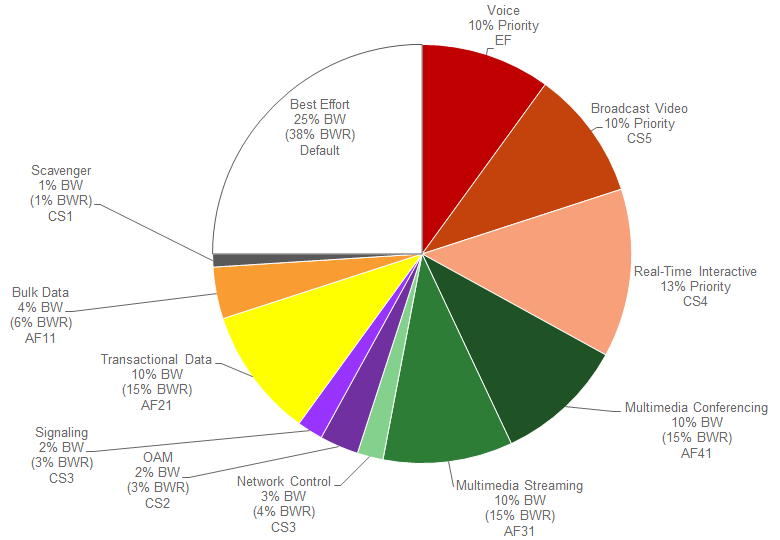
- Note: The bandwidth allocations per traffic-class for the default CVD_Queuing_Profile within APIC-EM 1.5 and higher are the same as in the default CVD_BW_Profile within APIC-EM 1.4. However, the bandwidth allocations are slightly different for some traffic-classes from the bandwidth allocations for the WAN-edge Queuing Policy within APIC-EM 1.3 and below.
When using the default Queuing Profile (CVD_Queuing_Profile), bandwidth allocations for the WAN edge queuing policy are fixed and cannot be modified. Because queuing is done in software on ISR and ASR router platforms, the WAN-edge egress queuing policy implements a 12 queue model—meaning a queue for each of the traffic-classes within the RFC 4594-based 12-class QoS model shown in Figure 5 earlier in this document.
The following table shows the mapping of the traffic-classes and bandwidth allocations from the default EasyQoS CVD_Queuing_Profile to the WAN-Edge egress queuing policy structure.
- Default Queuing Profile Mapping to WAN-Edge Egress Queuing Policy
| Traffic Class | DSCP Marking | BW % in the Default Queuing Profile | BWR % Calculated from the Default Queuing Profile | WAN-Edge Egress Queue Mapping | BW Allocation in the WAN-Edge Egress Queue |
|---|---|---|---|---|---|
| Voice | EF | 10% | N/A | VOICE | VOICE bandwidth is priority and policed to 10% |
| Broadcast Video | CS5 | 10% | N/A | BROADCAST | BROADCAST bandwidth is priority and policed to 10% |
| Real-Time Interactive | CS4 | 13% | N/A | REALTIME | REALTIME bandwidth is priority and policed to 13% |
| Multimedia Conferencing | AF41 | 10% | 15% | MM_CONF | BWR for MM_CONF = 15% |
| Multimedia Streaming | AF31 | 10% | 15% | MM_STREAM | BWR MM_STREAM = 15% |
| Network Control | CS6 | 3% | 4% | CONTROL | BWR for CONTROL = 4% |
| Signaling | CS3 | 2% | 3% | SIGNALING | BWR for SIGNALING = 3% |
| OAM | CS2 | 2% | 3% | OAM | BWR for OAM = 3% |
| Transactional Data | AF21 | 10% | 15% | TRANS_DATA | BWR for TRANS_DATA = 15% |
| Bulk Data | AF11 | 4% | 6% | BULK_DATA | BWR for BULK_DATA = 6% |
| Scavenger | CS1 | 1% | 1% | SCAVENGER | BWR for SCAVENGER = 1% |
| Best Effort | Default | 25% | 38% | Default Queue | BWR for Default Queue = 38% |
Column 3 of the table above shows the percentage bandwidth allocation for each of the traffic-classes as it appears within the EasyQoS GUI for the default CVD_Queuing_Profile.
The WAN-Edge Queuing policy implements three low-latency queues via the “police rate percent” commands for the VOICE, BROADCAST, and REALTIME traffic-classes within the policy-map definition. The bandwidth allocated within the EasyQoS GUI for the default Queuing Profile directly maps to the bandwidth within “police rate percent” statements for these three traffic-classes.
The sum of the bandwidth allocated to these three traffic-classes can be considered as the total priority queue bandwidth (Total_PQ_BW), as shown in the following formula.
Total_PQ_BW = Voice BW + Broadcast Video BW + Real-Time Interactive BW
Based on the bandwidth allocations in column 3 in the table above Total_PQ_BW can be calculated as follows:
Total_PQ_BW = 10% (Voice) + 10% (Broadcast Video) + 13% (Real-Time Interactive) = 33%
For the remaining nine traffic-classes the BWR percentages shown in column 4 of the table above can be calculated based on the amount of bandwidth allocated to each traffic-class through the EasyQoS GUI, and the amount of Total_PQ_BW calculated above. This can be done through the following formula.
Traffic_Class_BWR = (Traffic_Class_BW / (100% – Total_PQ_BW)) * 100
For example, BWR percentage for the Multimedia Streaming traffic class can be calculated as follows.
Multimedia_Conferencing_BWR = (10% / (100% – 33%)) * 100 = 15% when rounded
Because each traffic-class is mapped to a separate queue, determining the bandwidth ratio allocated to each of the non-priority queues within the WAN-Edge egress queuing model is simply a matter of copying the Traffic_Class_BWR numbers to the each of the queues shown in column 6 in the table above.
Class-map Definitions
The following are the class-map definitions for each of the 12 queues provisioned by EasyQoS.
!
class-map match-any prm-EZQOS_12C#VOICE
match dscp ef
class-map match-any prm-EZQOS_12C#BROADCAST
match dscp cs5
class-map match-any prm-EZQOS_12C#REALTIME
match dscp cs4
class-map match-any prm-EZQOS_12C#CONTROL
match dscp cs6
class-map match-any prm-EZQOS_12C#SIGNALING
match dscp cs3
class-map match-any prm-EZQOS_12C#OAM
match dscp cs2
class-map match-any prm-EZQOS_12C#MM_CONF
match dscp af41
match dscp af42
match dscp af43
class-map match-any prm-EZQOS_12C#MM_STREAM
match dscp af31
match dscp af32
match dscp af33
class-map match-any prm-EZQOS_12C#TRANS_DATA
match dscp af21
match dscp af22
match dscp af23
class-map match-any prm-EZQOS_12C#BULK_DATA
match dscp af11
match dscp af12
match dscp af13
class-map match-any prm-EZQOS_12C#SCAVENGER
match dscp cs1
!
Policy-map Definition
The following is an example of the policy-map definition for the WAN-edge egress queuing policy for an ISR or ASR router when using the default Queuing Profile (CVD_Queuing_Profile), provisioned by EasyQoS.
!
policy-map prm-dscp#QUEUING_OUT
class prm-EZQOS_12C#VOICE
police rate percent 10
priority
class prm-EZQOS_12C#BROADCAST
police rate percent 10
priority
class prm-EZQOS_12C#REALTIME
police rate percent 13
priority
class prm-EZQOS_12C#MM_CONF
bandwidth remaining percent 15
fair-queue
random-detect dscp-based
class prm-EZQOS_12C#MM_STREAM
bandwidth remaining percent 15
fair-queue
random-detect dscp-based
class prm-EZQOS_12C#CONTROL
bandwidth remaining percent 4
class prm-EZQOS_12C#SIGNALING
bandwidth remaining percent 3
class prm-EZQOS_12C#OAM
bandwidth remaining percent 3
class prm-EZQOS_12C#TRANS_DATA
bandwidth remaining percent 15
fair-queue
random-detect dscp-based
class prm-EZQOS_12C#BULK_DATA
bandwidth remaining percent 6
fair-queue
random-detect dscp-based
class prm-EZQOS_12C#SCAVENGER
bandwidth remaining percent 1
class class-default
bandwidth remaining percent 38
fair-queue
random-detect dscp-based
random-detect dscp 0 50 64 ! ISR G2 and 800 Series platforms only.
!
The Voice queue supports traffic with an EF per hop behavior. The Broadcast-Video queue supports traffic with a Class Selector 5 (CS5) per hop behavior. The Realtime-Interactive traffic class supports traffic with a CS4 per hop behavior. Broadcast-Video and Realtime-Interactive traffic-classes are meant to support traffic flows that are inelastic—meaning the endpoints generating the flows do not down-speed their transmission rate when packet loss occurs. Because of the inelastic nature of these flows, they are eligible for LLQ treatment on the ISR or ASR router platforms, along with Voice traffic. Explicit policers (10%, 10%, and 13% respectively) ensure that each of the LLQs can use no more than the percentage of the bandwidth of the WAN link allocated to the traffic class, regardless of whether there is available bandwidth.
The remaining nine queues share the remaining bandwidth based on a percentage allocation of bandwidth. This is accomplished via the “bandwidth remaining percent” command. Each of these queues can use more than its percentage allocation, if more bandwidth is available—meaning if the one or more of the other queues is not using its full allocation of remaining bandwidth percentage.
The Multimedia-Conferencing, Multimedia-Streaming, Transactional Data, and Bulk Data queues support traffic with Assured Forwarding (AF) per-hop behaviors (AF4x, AF3x, AF2x, and AF1x respectively). Fair-queuing, along with DSCP-based WRED is implemented for these traffic-classes. The minimum and maximum WRED thresholds for these queues is left at their default values.
For ISR G2 and 800 Series platforms, the default queue limit size is 64 packets per queue. The minimum and maximum WRED thresholds are expressed in terms of the number of packets. The default WRED thresholds for the AF per-hop behaviors, and the drop probability is shown in the following table.
- ISR G2 WRED Minimum & Maximum Threshold and Drop Probability Default Values
| Per-Hop Behavior and DSCP Value | Minimum Threshold (Packets) | Maximum Threshold (Packets) | Drop Probability |
|---|---|---|---|
| AF11 (DSCP 10) | 32 | 40 | 1/10 |
| AF12 (DSCP 12) | 28 | 40 | 1/10 |
| AF13 (DSCP 14) | 24 | 40 | 1/10 |
| AF21 (DSCP 18) | 32 | 40 | 1/10 |
| AF22 (DSCP 20) | 28 | 40 | 1/10 |
| AF23 (DSCP 22) | 24 | 40 | 1/10 |
| AF31 (DSCP 26) | 32 | 40 | 1/10 |
| AF32 (DSCP 28) | 28 | 40 | 1/10 |
| AF33 (DSCP 30) | 24 | 40 | 1/10 |
| AF41 (DSCP 34) | 32 | 40 | 1/10 |
| AF42 (DSCP 36) | 28 | 40 | 1/10 |
| AF43 (DSCP 38) | 24 | 40 | 1/10 |
| Default (DSCP 0) | 20 | 40 | 1/10 |
The Default queue also implements fair-queuing, along with DSCP-based WRED. WRED is effective here at preventing TCP synchronization of flows, which can result in overall lower throughput and bandwidth utilization. For the ISR G2 and 800 Series platforms, the default WRED thresholds for the Default queue are considered to be too aggressive—meaning the minimum drop threshold is set lower than desired. Hence, the minimum drop threshold has been adjusted to 50 packets, and the maximum drop threshold adjusted to the depth of the queue—64 packets. For the ISR 4400 and ASR 1000 Series platforms, the default WRED thresholds for the Default queue are left at their default values.
The Control, Signaling, OAM, and Scavenger queues each support a single Class Selector (CS) per hop behavior (CS6, CS3, CS2, and CS2, respectively). For the Control, Signaling, and OAM traffic-classes, WRED is not implemented. Randomly discarding network control, signaling, or operational traffic when a minimum queue depth threshold is exceeded, may simply result in degraded network performance. Hence these queues implement tail-drop at the back of the queue, because the objective is to not drop traffic in these queues by provisioning sufficient remaining bandwidth percentage allocation to these queues.
The Scavenger queue is considered to be a bandwidth-constrained queue for less-than-best-effort treatment. WRED is not implemented for this queue, because the consideration is not to optimize the use of this queue but simply to provision some minimal amount of bandwidth for support of traffic within this queue.
Application of the Egress Queuing Policy to Interfaces
The egress queuing policy is applied to all Ethernet interfaces on the ISR or ASR router platform, with the following exception:
- Interfaces which have been excluded from the QoS policy by the network operator, through the EasyQoS web-based GUI. This was discussed in the *Policies* section of the *APIC-EM and the EasyQoS Application* chapter.
When using custom Queuing Profiles (discussed in the next section) with different bandwidth allocations for different interface speeds, the service-policy name will match the name of the policy-map generated for the particular interface speed.
An example of the application of the egress queuing policy is as follows:
!
interface GigabitEthernet0/1
service-policy output prm-DSCP#QUEUING_OUT
!
For brownfield deployments, EasyQoS will remove any existing egress queuing service-policy statements that appear on the interface, before applying the prm-DSCP#QUEUING_OUT service-policy. However, policy-map and class-map definitions for the existing policy will remain within the configuration of the ASR or ISR router platform. This provides the network operator the option to restore the configuration of the ISR or ASR router platform to its original non-EasyQoS policy, should that be necessary.
Custom Queuing Profiles
APIC-EM/EasyQoS release 1.5 and higher provides the network operator the ability to change the both the DSCP marking and the bandwidth allocation of traffic-classes through custom Queuing Profiles, within the web-based GUI. This feature was discussed in the *Advanced Settings* section of the *APIC-EM and the EasyQoS Application* chapter. Specifically, Figures 36 and 37 showed an example custom Queuing Profile named EasyQoS_Lab_Queuing_Profile. The bandwidth allocations for the 12 traffic-classes for this example Queuing Profile (for 1 Gbps interfaces) are shown in column 3 of the following table. Likewise, the DSCP markings for the 12 traffic-classes are shown in column 2.
- EasyQoS_Lab_Queuing Profile Mapping to WAN-Edge Egress Queuing Policy
| Traffic Class | DSCP Marking | BW % in the EasyQoS Lab Queuing Profile | BWR % Calculated from the EasyQoS Lab Queuing Profile | WAN-Edge Egress Queue Mapping | BW Allocation in the WAN-Edge Egress Queue |
|---|---|---|---|---|---|
| Voice | EF | 5% | N/A | VOICE | VOICE bandwidth is priority and policed to 10% |
| Broadcast Video | CS3 | 5% | N/A | BROADCAST | BROADCAST bandwidth is priority and policed to 10% |
| Real-Time Interactive | CS4 | 5% | N/A | REALTIME | REALTIME bandwidth is priority and policed to 13% |
| Multimedia Conferencing | AF41 | 10% | 15% | MM_CONF | BWR for MM_CONF = 15% |
| Multimedia Streaming | AF31 | 10% | 15% | MM_STREAM | BWR MM_STREAM = 15% |
| Network Control | CS6 | 3% | 4% | CONTROL | BWR for CONTROL = 4% |
| Signaling | CS5 | 3% | 3% | SIGNALING | BWR for SIGNALING = 3% |
| OAM | CS2 | 8% | 3% | OAM | BWR for OAM = 3% |
| Transactional Data | AF21 | 10% | 15% | TRANS_DATA | BWR for TRANS_DATA = 15% |
| Bulk Data | AF11 | 10% | 6% | BULK_DATA | BWR for BULK_DATA = 6% |
| Scavenger | CS1 | 1% | 1% | SCAVENGER | BWR for SCAVENGER = 1% |
| Best Effort | Default | 30% | 38% | Default Queue | BWR for Default Queue = 38% |
The effects of the changes in DSCP marking and bandwidth allocation on the ingress classification & marking policy and the egress queuing policy provisioned to ASR and ISR router platforms are discussed in the sections below.
Changing the DSCP Markings of Traffic-Classes through Custom Queuing Profiles
Changing the DSCP marking of a traffic-class will modify the policy-action of the ingress classification & marking policy class-map definitions that reference the traffic-class.
- Note: Caution should be used when changing the default DSCP marking of traffic-classes from the Cisco recommended 12-class QoS model. Such changes could result in a less than optimal QoS implementation unless the network operator is highly knowledgeable in QoS design and implementation. This feature is only for customers with advanced knowledge of QoS.
The following output provides an example of the ingress classification & marking policy where Broadcast Video traffic has been marked to CS3 and Signaling traffic has been marked to CS5 (as specified in IETF RFC 4594). The affected class-map definitions in the policy-map are highlighted in bold.
!
policy-map prm-MARKING_IN
class prm-MARKING_IN#TUNNELED-NBAR
class prm-MARKING_IN#VOICE_CUSTOM
set dscp ef
class prm-MARKING_IN#BROADCAST_CUSTOM
set dscp cs3
class prm-MARKING_IN#REALTIME_CUSTOM
set dscp cs4
class prm-MARKING_IN#MM_CONF_CUSTOM
set dscp af41
class prm-MARKING_IN#MM_STREAM_CUSTOM
set dscp af31
class prm-MARKING_IN#CONTROL_CUSTOM
set dscp cs6
class prm-MARKING_IN#SIGNALING_CUSTOM
set dscp cs5
class prm-MARKING_IN#OAM_CUSTOM
set dscp cs2
class prm-MARKING_IN#TRANS_DATA_CUSTOM
set dscp af21
class prm-MARKING_IN#BULK_DATA_CUSTOM
set dscp af11
class prm-MARKING_IN#SCAVENGER_CUSTOM
set dscp cs1
class prm-MARKING_IN#VOICE
set dscp ef
class prm-MARKING_IN#BROADCAST
set dscp cs3
class prm-MARKING_IN#REALTIME
set dscp cs4
class prm-MARKING_IN#MM_CONF
set dscp af41
class prm-MARKING_IN#MM_STREAM
set dscp af31
class prm-MARKING_IN#CONTROL
set dscp cs6
class prm-MARKING_IN#SIGNALING
set dscp cs5
class prm-MARKING_IN#OAM
set dscp cs2
class prm-MARKING_IN#TRANS_DATA
set dscp af21
class prm-MARKING_IN#BULK_DATA
set dscp af11
class prm-MARKING_IN#SCAVENGER
set dscp cs1
class class-default
set dscp default
!
As can be seen in the example output above, the “set dscp” policy-action commands are modified to the desired DSCP markings for the traffic-classes.
- Note: Cisco recommends a modified version of RFC 4594 where Signaling traffic is marked to CS3 and Broadcast Video is marked to CS5. The default setting for call signaling within Cisco Unified Communications Manager is set to CS3.
Changing the DSCP markings of traffic-classes within the EasyQoS web-based GUI also affects the “match dscp” statements of class-map definitions within the egress queuing policy of ISR and ASR router platforms. This applies only to the WAN-Edge Egress Queuing Policy discussed previously and not to the egress queuing policies provisioned when WAN SPPs, which are discussed in the next chapter, are used.
The following output is an example of the modification of the class-map definitions provisioned by EasyQoS, based upon the DSCP markings from the EasyQoS_Lab_Queuing Profile, shown in the table above. The affected class-map definitions in the policy-map are highlighted in bold.
!
class-map match-any prm-EZQOS_12C#VOICE
match dscp ef
class-map match-any prm-EZQOS_12C#BROADCAST
**match dscp cs3 **
class-map match-any prm-EZQOS_12C#REALTIME
match dscp cs4
class-map match-any prm-EZQOS_12C#CONTROL
match dscp cs6
class-map match-any prm-EZQOS_12C#SIGNALING
**match dscp cs5 **
class-map match-any prm-EZQOS_12C#OAM
match dscp cs2
class-map match-any prm-EZQOS_12C#MM_CONF
match dscp af41
match dscp af42
match dscp af43
class-map match-any prm-EZQOS_12C#MM_STREAM
match dscp af31
match dscp af32
match dscp af33
class-map match-any prm-EZQOS_12C#TRANS_DATA
match dscp af21
match dscp af22
match dscp af23
class-map match-any prm-EZQOS_12C#BULK_DATA
match dscp af11
match dscp af12
match dscp af13
class-map match-any prm-EZQOS_12C#SCAVENGER
match dscp cs1
!
As can be seen by comparing the class-map definitions between the default Queuing Profile (CVD_Queuing_Profile) and the EasyQoS_Lab_Queuing Profile, the Broadcast traffic-class matches on CS3 instead of CS5, and the Signaling traffic-class matches on CS5.
Changing the Bandwidth Allocation of Traffic-Classes through Custom Queuing Profiles
Bandwidth allocations done through custom Queuing Profiles modify the amount bandwidth allocated through the “police rate percent” and “bandwidth remaining percent” commands within the egress queuing policy-map definition. Again, this applies only to the WAN-Edge Egress Queuing Policy discussed previously, and not to the egress queuing policies provisioned when WAN SPPs, which are discussed in the next chapter, are used.
Table 6 above shows how changing the amount of bandwidth allocated to each traffic class modifies the bandwidth allocated to the three low-latency and nine non-priority queues within the WAN-Edge Egress Queuing Policy model.
Based on the formula discussed previously, the new total priority queue bandwidth (Total_PQ_BW) is calculated as follows:
Total_PQ_BW = 5% (Voice BW) + 5% (Broadcast Video BW) + 5% (Real-Time Interactive BW) = 15%
For the remaining nine traffic-classes the BWR percentages shown in column 4 of the table above can be calculated based on the amount of bandwidth allocated to each traffic class through the EasyQoS GUI, and the amount of Total_PQ_BW, through the following formula.
Traffic_Class_BWR = (Traffic_Class_BW / (100% – Total_PQ_BW)) * 100
For example, the new BWR percentage for the Multimedia Streaming traffic class can be calculated as follows:
Multimedia_Conferencing_BWR = (10% / (100% – 15%)) * 100 = 12% when rounded
Because each traffic-class is mapped to a separate queue, determining the bandwidth ratio allocated to each of the non-priority queues within the WAN-Edge Egress Queuing Policy model is simply a matter of copying the Traffic_Class_BWR numbers to the each of the queues shown in column 6 in the Table 6 above.
Note that some rounding error may be introduced in order to ensure the “bandwidth remaining percentage” statements within the WAN-Edge Queuing policy-map definition total to 100%.
This results in the following egress queuing policy-map definition when deployed on an ASR or ISR router platform.
!
policy-map prm-dscp#QUEUING_OUT#1G
class prm-EZQOS_12C#VOICE
police rate percent 5
priority
class prm-EZQOS_12C#BROADCAST
police rate percent 5
priority
class prm-EZQOS_12C#REALTIME
police rate percent 5
priority
class prm-EZQOS_12C#MM_CONF
bandwidth remaining percent 12
fair-queue
random-detect dscp-based
class prm-EZQOS_12C#MM_STREAM
bandwidth remaining percent 12
fair-queue
random-detect dscp-based
class prm-EZQOS_12C#CONTROL
bandwidth remaining percent 4
class prm-EZQOS_12C#SIGNALING
bandwidth remaining percent 4
class prm-EZQOS_12C#OAM
bandwidth remaining percent 9
class prm-EZQOS_12C#TRANS_DATA
bandwidth remaining percent 12
fair-queue
random-detect dscp-based
class prm-EZQOS_12C#BULK_DATA
bandwidth remaining percent 12
fair-queue
random-detect dscp-based
class prm-EZQOS_12C#SCAVENGER
bandwidth remaining percent 1
class class-default
bandwidth remaining percent 34
fair-queue
random-detect dscp-based
random-detect dscp 0 50 64 ! ISR G2 and 800 Series platforms only.
!
The network operator should also note that the bandwidth allocations for each of the traffic-classes within custom Queuing Profiles configured within the EasyQoS GUI can be applied to all interface speeds—referred to as All References within the EasyQoS GUI. Alternatively different bandwidth allocations can be configured for each of the traffic-classes based on the interface speed—1 Mbps, 10 Mbps, 100 Mbps, 1 Gbps, 10 Gbps, and 100 Gbps.
In the configuration example above, the bandwidth allocations have been modified from the CVD_Queuing_Profile for 1 Gbps interface speeds. When different bandwidth allocations are assigned to each of the interface speeds within the EasyQoS GUI for custom Queuing Profiles, EasyQoS will append the interface speed to the name of the policy-map generated, in order to differentiate the policy-map for that particular interface speed. For example, the policy-map name in the configuration above has been changed from “policy-map prm-dscp#QUEUING_OUT” to “policy-map prm-dscp#QUEUING_OUT#1G” indicating this policy-map is to be applied to 1 Gbps interfaces. In this manner, different policy-maps with different bandwidth allocations for the traffic-classes can be generated by EasyQoS for the various interface speeds supported by the platform—all within a single custom Queuing Profile. The network operator can use this flexibility in order to assign different bandwidth allocations for uplink ports vs. access-edge ports within a single custom Queuing Profile, if desired.
If the bandwidth allocations for each of the traffic-classes within a custom Queuing Profile is the same across all interface speeds (referred to as All References wihtin the EasyQoS GUI), EasyQoS will optimize the configuration, and create a single policy-map with the name “policy-map prm-dscp#QUEUING_OUT” with the bandwidth allocations specified within the custom Queuing Profile.
ASR-1000 Series Specific Interface-Level Commands
For the ASR-1000 Series platforms, additional interface-level configuration commands are provisioned by APIC-EM EasyQoS. Network input/output on the ASR-1000 Series platforms consists of shared port adapters (SPAs) controlled by one or more SPA interface processors (SIPs). Ethernet and ATM SPAs perform Layer 2 and Layer 3 packet classification, and they also decide on the internal priority of the packet—high priority or low priority. High-priority packets are sent on separate channels to the embedded services processor (ESP) than low-priority packets. QoS is then performed within the ESP. The SPA queues packets on high channels to high-priority buffers, and packets on low channels to low-priority buffers. Internal classification of packets can be based on DSCP, IPv6 traffic class, MPLS EXP or 802.1Q/P class of service (CoS) values.
APIC-EM EasyQoS enables SPA-based internal scheduling and classification by provisioning the following commands on ASR 1000 Series platforms:
!
plim qos input map ip DSCP-based
plim qos input map ip DSCP 32 40 46 queue strict-priority
!
The first command enables DSCP-based classification within the SPA. By default, EF (voice) traffic is mapped to the strict-priority internal queue, and all other DSCP values are mapped to the low-priority internal queue. The second command modifies this by mapping CS4 (real-time interactive) and CS5 (broadcast video) traffic to the strict-priority internal queue.
- Note: When restoring the configuration on an ASR 1000 Series platform to a pre-EasyQoS policy, APIC-EM will not remove any of the “plim qos” commands configured on the platform. This must be manually removed by the network operator if desired.
Pre-Existing QoS Configurations on ISR and ASR Router Platforms
This section discusses how EasyQoS handles prior QoS configurations on ISR and ASR router platforms when deploying a QoS policy. IOS (ISR G2 and 800 Series routers) and IOS XE (ISR 4400 and ASR 1000 Series routers) platforms implement both ingress classification & marking policies and queuing policies by applying a service-policy definition across interfaces. The service-policy definition references an existing policy-map definition. For both ingress classification & marking policies and queuing policies, EasyQoS will remove any existing service-policy definition from the interface and replace it with its service-policy definitions. The previous class-map and policy-map definitions will not be deleted by EasyQoS. This is necessary for restoring the original pre-EasyQoS (before any EasyQoS configuration was applied) configuration back to the switch platform. Clicking the Restore button within an EasyQoS policy will cause the pre-EasyQoS classification & marking and queuing service-policy statements to be re-applied to the interfaces.
- Note: If the network operator as manually deleted the original QoS configuration (that is, the Pre-EasyQoS configuration)—meaning the policy-map and class-map definitions—the Restore feature will not be able to restore the QoS configuration on the device to its original configuration.
The Restore feature will not remove any “plim qos” commands on the ASR 1000 Series platforms discussed in the *ASR-1000 Series Specific Interface-Level Commands* section above.